· guides, reference
How to convert a font: OTF, TTF, WOFF and back

Converting a font means translating its outlines and data into another format, usually with FontForge on your own machine. Some directions are lossless, some re-draw every curve, and one, Type 1, is a rescue. The conversion cannot add glyphs or features, and the license may forbid it outright.
Do you even need to convert?
Most of the time, no. Windows, macOS, Linux, and every current browser accept OTF and TTF side by side, and the two install the same way. If a program opens one, it almost always opens the other. The full map of what each extension means is our guide to font file types.
Convert when something specific forces it: legacy software, or an embroidery or game tool that accepts one flavor only; web packaging, where WOFF2 is what browsers want; or a dead format, above all Type 1, that nothing current will open at all.
What does a converter actually do?
A converter reads a font in one dialect and writes it in another. The outlines are mathematics: CFF fonts draw with cubic curves, TrueType fonts with quadratic curves, and moving between them means re-expressing every curve, not copying it. Around the outlines sits packaging: names, metrics, kerning, layout features, and hinting, each stored in tables that a converter rebuilds in the new file.
Two limits follow. A conversion cannot add anything: no new glyphs, no features the source lacks, no hinting out of thin air. And the output is a new file whose quality depends on the direction you travel. One direction below is nearly free; another is an approximation every time.
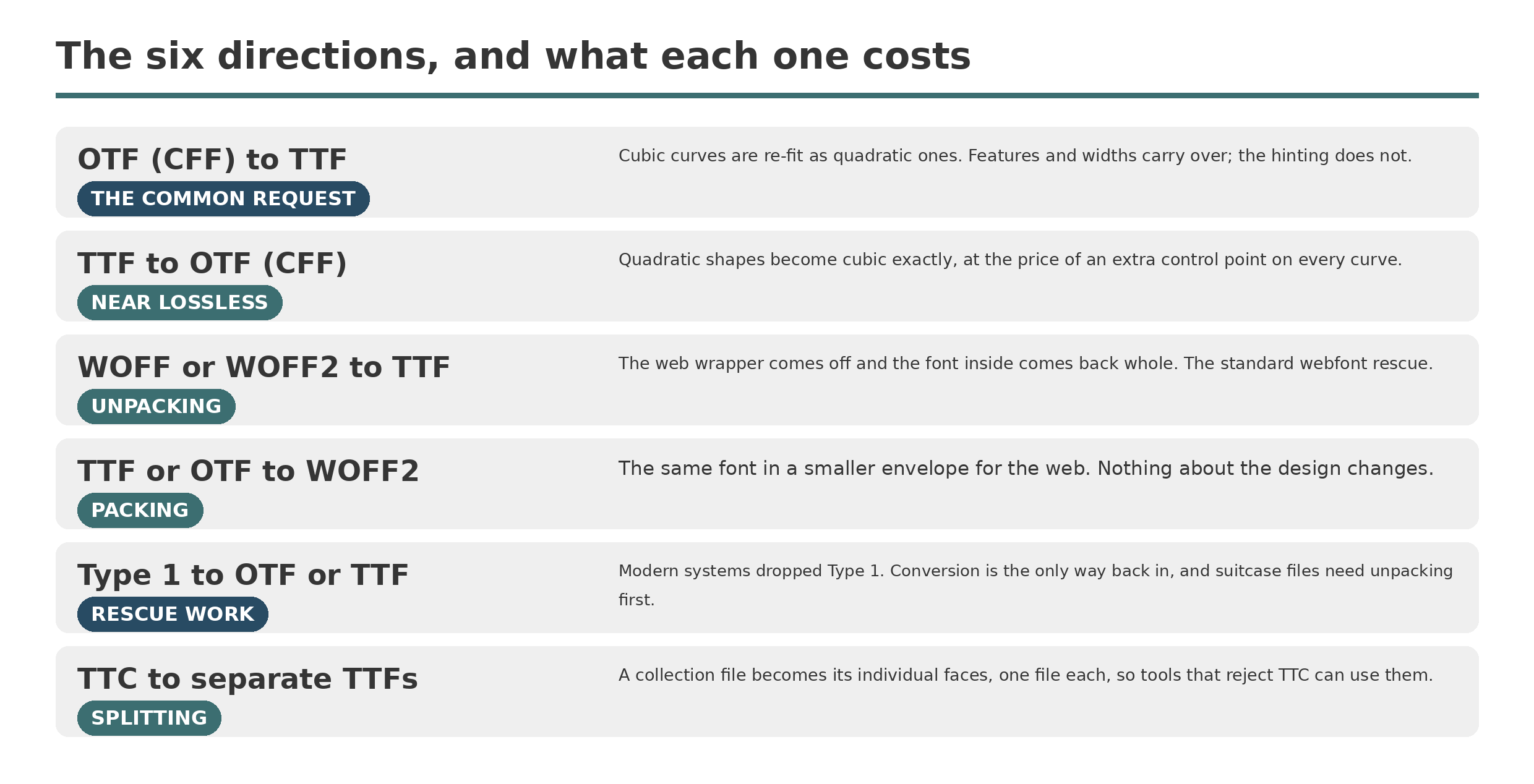
The six conversion directions are four different kinds of job. Only one of them redraws your letterforms.
How do you convert OTF to TTF?
This is the most requested direction, usually because a program or an upload form demands TrueType. The shapes survive, but every cubic curve is re-fit as one or more quadratic curves, because a quadratic span bends less freely than a cubic one. Good converters hold the shape closely; the visible cost is more, shorter spans, as the letter below shows.
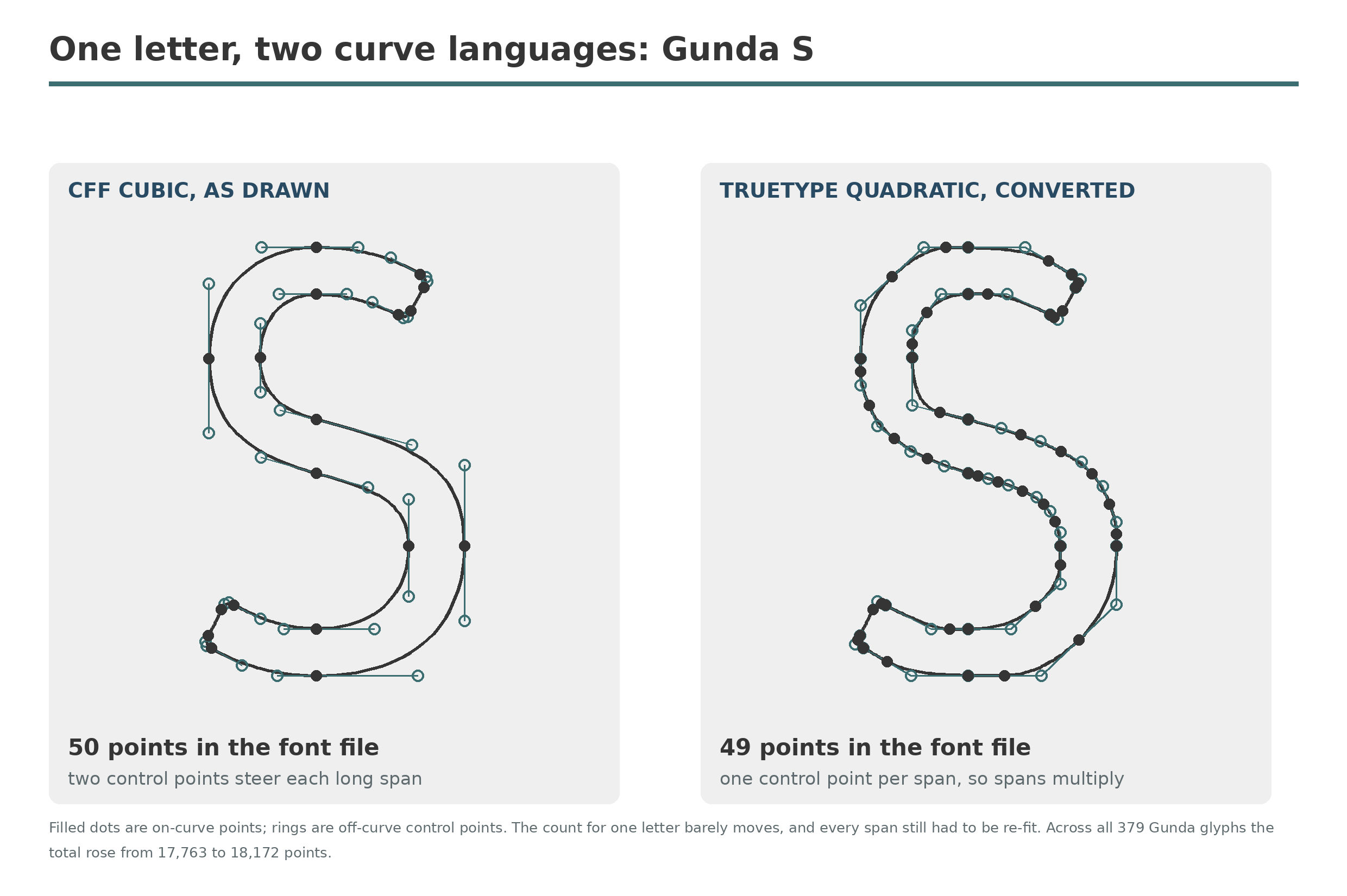
The same letter drawn in two curve languages. The points are the real ones, read from the two files in our test below.
What does not survive is hinting. A CFF font’s hints are written for a different system, converters discard them, and the TTF usually comes out unhinted, or gets automatic hinting afterward. Features are a different story: in our test below, GSUB features and GPOS kerning carried over completely. At text sizes on screen, lost hinting can matter more than the curve fit.
How do you convert TTF to OTF?
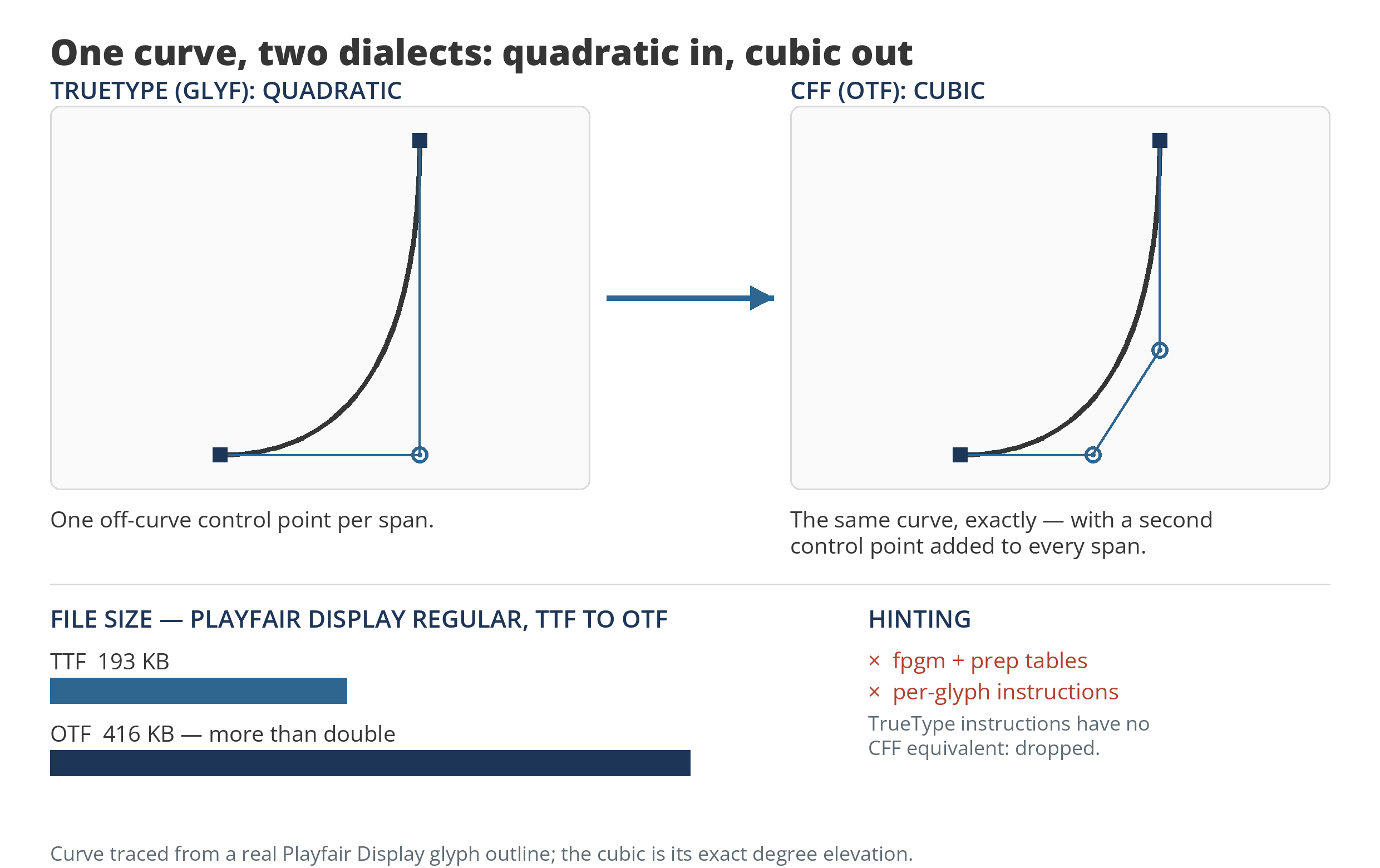
The easy direction. A quadratic curve converts to a cubic exactly, so the geometry is lossless; each span simply gains a second control point. The traps are practical. A naive conversion can balloon the file, as ours did below, and TrueType hinting has no CFF equivalent, so an instructed font loses its instructions. Nothing is gained either: the result is the same design in the other container, worth doing when a print workflow or an older application insists on CFF.
How do you get a TTF out of a WOFF or WOFF2?
WOFF and WOFF2 are not outline formats at all. They are the desktop font, compressed for delivery: WOFF wraps it in zlib, WOFF2 in Brotli. Unwrapping one is therefore not a conversion in the curve sense. The font inside comes back whole, tables and hinting included, which makes this the standard way to recover your own webfonts when the desktop originals are lost.
Two warnings. The webfont may have been subset before it was wrapped, in which case the recovered font is only as complete as that subset. And recovery is for fonts you hold the rights to. A WOFF2 file on someone else’s site is their licensed copy, not a download format.
Can you still convert a Type 1 font?
Yes, and for Type 1 it is a rescue, not a preference. Photoshop dropped Type 1 fonts in 2021 (version 23.0), and the remaining Adobe applications ended Type 1 support in January 2023, and current macOS versions will not use the format at all; the five-file kit described in our post on archaic font formats is a fossil. FontForge and TransType both read Type 1 and write OpenType, carrying the outlines and, when the AFM metrics file is present, the widths and kern pairs. Type 1 predates OpenType features, so there are none to lose.
Old Mac suitcases are the hard case: the outlines live in a resource fork that modern tools cannot open directly, so the font has to be extracted from the suitcase first. That is where Type 1 work stops being a menu click and becomes font surgery.
What about TTC files, and is subsetting a conversion?
A TTC is a collection: several complete fonts sharing one file, common for large CJK families. Splitting one is bookkeeping, not translation. Tools such as fontTools write each face out as its own TTF or OTF with the outlines untouched.
Subsetting is different again, and it is not a conversion at all. A subset keeps the same format and removes glyphs, the way a webfont keeps only the characters a site actually displays. Same file type, smaller cast.
What survives a conversion? We measured it
We converted two open fonts with FontForge and compared the results. Gunda Regular (Typofactur, CFF OTF, 379 glyphs) became a TTF: the file grew from 35 KB to 59 KB, the total outline points rose from 17,763 to 18,172, and every one of the 379 advance widths came through unchanged, along with all 15 GSUB lookups and all 7 GPOS lookups. Playfair Display Regular went the other way, TTF to OTF: 1,101 glyphs, every advance unchanged, all 42 GSUB and 8 GPOS lookups intact, but the file more than doubled to 416 KB, because a quick CFF build skips the compression a foundry build applies.
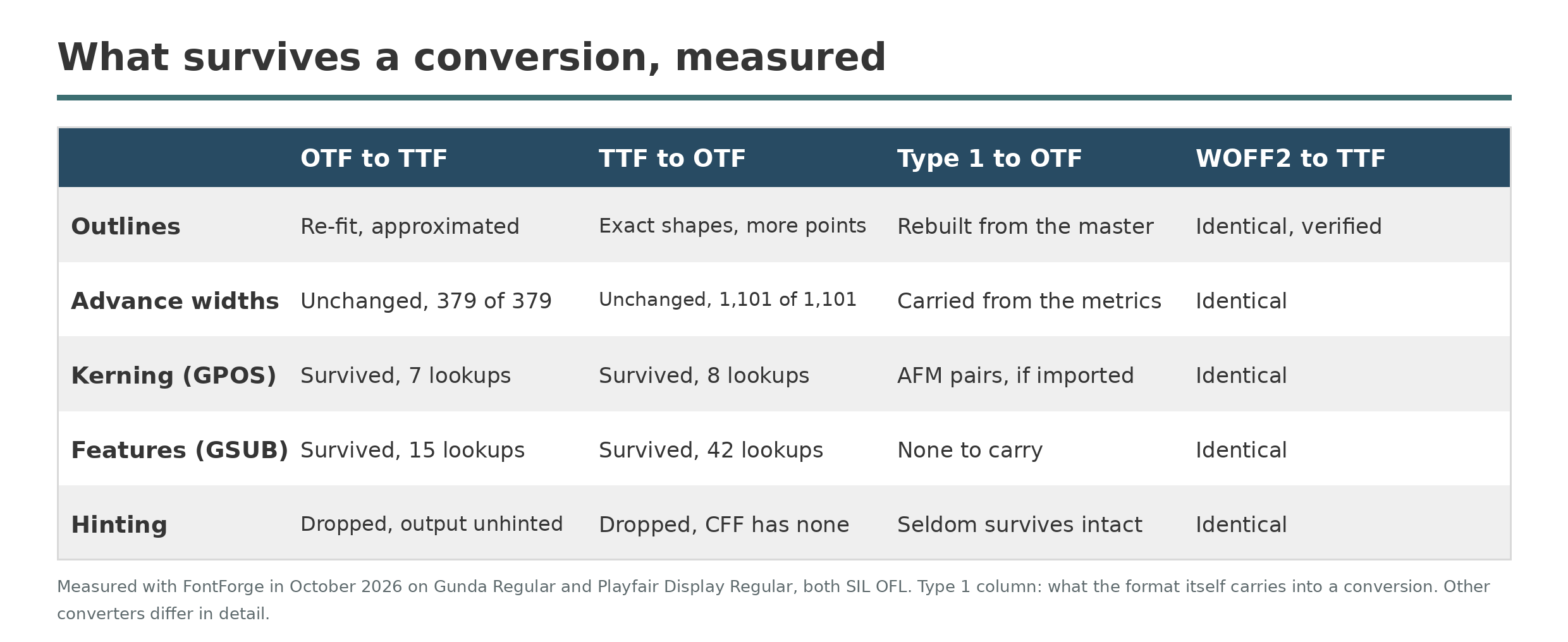
What survived, counted rather than assumed. The WOFF2 column is the round trip we verified glyph by glyph.
The WOFF2 check was cleaner still: wrapped and unwrapped again, Playfair’s outlines and table inventory came back identical. And in an earlier in-house test on a 1992 Type 1 master, a modern conversion deviated from the original outlines by 1.12 percent of ink area on average, against 2.13 percent for the period converter, with every real character’s width exact in both. Conversion error is real but small. The losses that bite are hinting, and, in careless tools, features.
Which converter should you use?
For a desktop conversion, start with FontForge. It is free and open source, opens and writes every format in this article, runs entirely on your own machine, and scripts well when a folder needs the same treatment. Our FontForge guide covers the editor in full. Everything measured above was done with it.
When the job is a whole library, TransType from FontLab is the professional tool: batch conversion that understands families and style linking, Type 1 revival as a headline feature, and fresh hinting built during conversion. It is paid software. For one file it is more than you need; for ten thousand legacy fonts it is the right shape of tool. Its rebuild method, and the Multiple Master trick it kept alive into the variable font era, get their own profile in our TransType post.
On the command line, fontTools and Google’s gftools are the workshop kit: WOFF2 packaging and unpacking, subsetting, merging, and table-level repairs. Treat them as plumbing rather than a converter app.
Online converters, CloudConvert and Online Font Converter among them, need no install and handle the common directions. Two caveats are structural. Uploading a commercial font to a stranger’s server can itself breach the license, which often forbids exactly that. And you cannot verify what the server keeps: one of the two states on its own page that files from failed conversions are retained for seven days of diagnostics. For an open font and a quick job they are fine. For anything you paid for, convert locally.
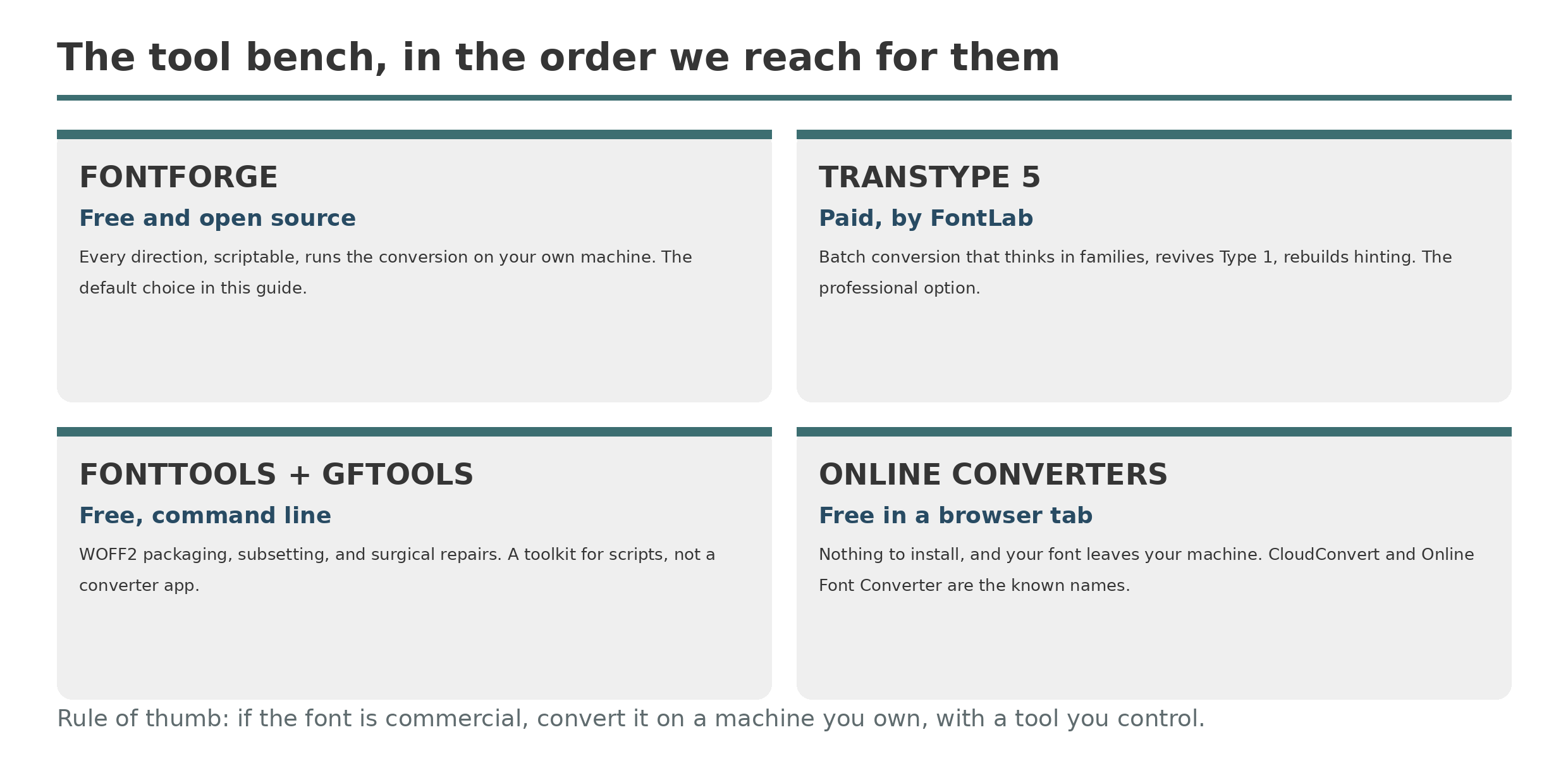
The bench, in the order we reach for them.
Does the license allow it?
Often the honest answer is: check first. Many commercial licenses forbid modifying or converting the font software at all, or permit a format change only for your own use, never for redistribution, and the converted file inherits the license of the original. The SIL Open Font License is the permissive case: it allows conversion and modification with conditions, including keeping the license attached and respecting Reserved Font Names. A font that cost nothing to download is not automatically yours to convert either; free of charge is not a license term. Our font licensing explainer walks through the categories. This is what licenses typically say, not legal advice. Read yours.
Before you convert: the checklist
- Keep the original untouched. Convert a copy, and name the output so the two files can never be confused.
- Read the license for a conversion or modification clause before you start, not after.
- Convert one style first, and proof it before touching the rest of the family.
- Proof with real text: a size waterfall, the kerning pairs you actually use, such as AV, To, and Yo, and a paragraph at text size, which is where lost hinting shows.
- Test the features you rely on in the output: small caps, oldstyle figures, ligatures. A converter that drops GSUB takes them silently.
Conversion is one of the oldest trades in digital type. When formats multiplied in the 1990s, dedicated converters such as FontMonger were professional tools, and the same job continues now. Pick the direction honestly, keep the original, and let the format follow the work.