· explainer
How Windows renders fonts: the DirectWrite years
When you type a letter in Windows, the glyph on screen has passed through more machinery, and more history, than any other part of the operating system you can see. Two rival text stacks (one from 1985, one from 2009) share the work; the font file itself is opened and parsed not by your app but by a sandboxed host process most users only notice as a strange account name in Task Manager; and the whole arrangement is the way it is because, for about twenty years, Windows parsed fonts inside its kernel, the most privileged layer of the system, until a string of exploits made that untenable. This is the pipeline, layer by layer.
The two stacks: GDI and DirectWrite
Every Windows app draws text through one of two APIs. GDI, the Graphics Device Interface, is the original: its text functions date to Windows 1.0 in 1985, and generations of software still call them. GDI itself does simple left-to-right placement; complex scripts and typographic features are handled by a helper library, Uniscribe (usp10.dll), bolted on in the late 1990s.
DirectWrite is the modern replacement, shipped with Windows 7 in 2009. It does its own shaping and layout, its own font enumeration and fallback (when a font lacks a character, DirectWrite, not the app, finds one that has it), and it renders through Direct2D with GPU acceleration. Modern browsers, Office, and most current software draw their text with DirectWrite; legacy applications and older controls still go through GDI. The two stacks coexist permanently, because the software written against GDI will never all be rewritten. That coexistence is the first reason the same font can look slightly different in two apps on the same machine: they are not using the same renderer.
The pipeline on Windows 10 and 11
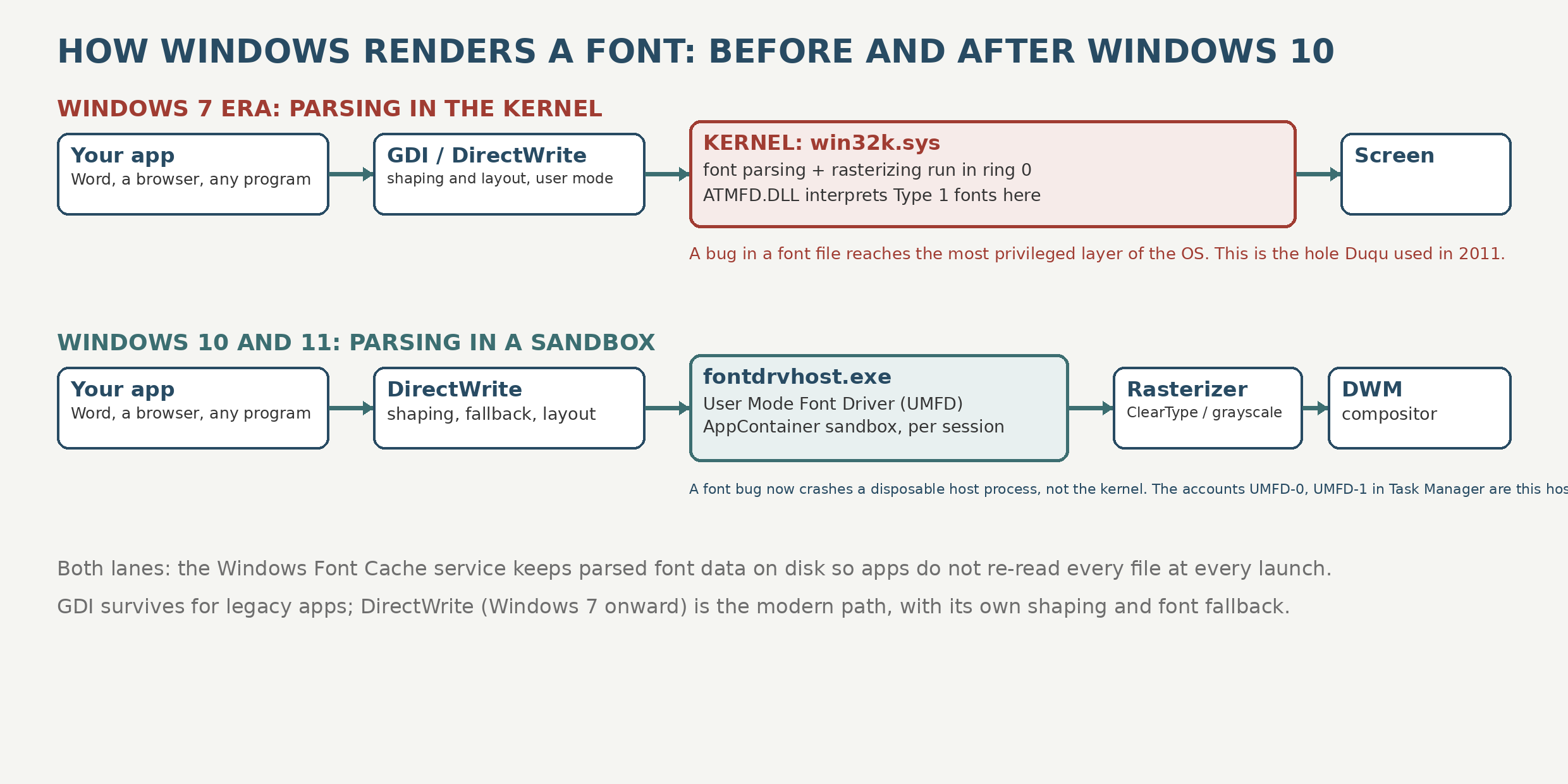
Step by step, for a modern (DirectWrite) app:
- Shaping. You type characters; DirectWrite’s analyzer turns the character run into a glyph run: script detection, bidirectional ordering, OpenType substitutions and positioning, and font fallback for anything the chosen font cannot draw. This happens in user-mode libraries inside your app’s process.
- Parsing. The font file’s tables (the cmap, the outlines, the hinting bytecode) are serviced by the User Mode Font Driver host, fontdrvhost.exe, a separate process running in an AppContainer sandbox under special per-session accounts. It is started by wininit and winlogon, it is signed by Microsoft and lives in System32, and if you have ever seen user accounts named UMFD-0 or UMFD-1 on a Windows machine and wondered whether something was wrong: that is this host, and it is supposed to be there.
- Caching. Parsed font data is kept by the Windows Font Cache service in on-disk cache files, so the system is not re-reading and re-validating every font file every time an app opens. A corrupt cache is the classic cause of the “all my fonts look wrong today” support call.
- Rasterization. The outline is scaled, hinted, and painted into pixels, normally with ClearType (below), by DirectWrite and Direct2D, increasingly on the GPU.
- Compositing. Since Windows Vista, apps do not draw on the screen directly. They render to off-screen surfaces, and the Desktop Window Manager (DWM) composites every window into the final image. Your glyph’s last trip is through the compositor like everything else.
GDI apps follow an older version of the same route, with one historical difference that matters, which is the next section.
Why fonts spent twenty years in the kernel
In 1996, with Windows NT 4.0, Microsoft moved the graphics subsystem, win32k, from user mode into the kernel, because the context switches of the older design were slow. Font parsing went with it. From then on, when GDI needed a font read, the reading happened in ring 0, and the interpreter for Adobe Type 1 fonts, ATMFD.DLL, a driver built on Adobe’s code, executed in the kernel too.
The performance was real. So was the blast radius, as our bizarre font uses post details: in 2011 the Duqu malware reached the kernel through a TrueType parsing bug, and Type 1 parsing bugs in ATMFD kept surfacing for years afterward, including two exploited flaws patched in April 2020. A font is untrusted input by nature (it arrives inside documents, web pages, and email), and Windows was parsing untrusted input in its most trusted layer.
Windows 10 reversed the NT4 decision for fonts. The User Mode Font Driver framework (UMFD) moved font drivers, ATMFD’s successors included, out of the kernel into fontdrvhost.exe: user mode, sandboxed in an AppContainer, restarted cheaply if it crashes, and unable to take the operating system with it if a malicious font corrupts it. ATMFD itself is gone entirely from Windows 10 version 1709 onward. Enterprises can go further: the Block Untrusted Fonts policy makes GDI refuse fonts installed outside the Windows Fonts folder, with an audit mode to test the impact first. The kernel still contains win32k and a large graphics surface; the font parsers, specifically, were evicted, because they had the worst record.
ClearType, and why DirectWrite text looks different
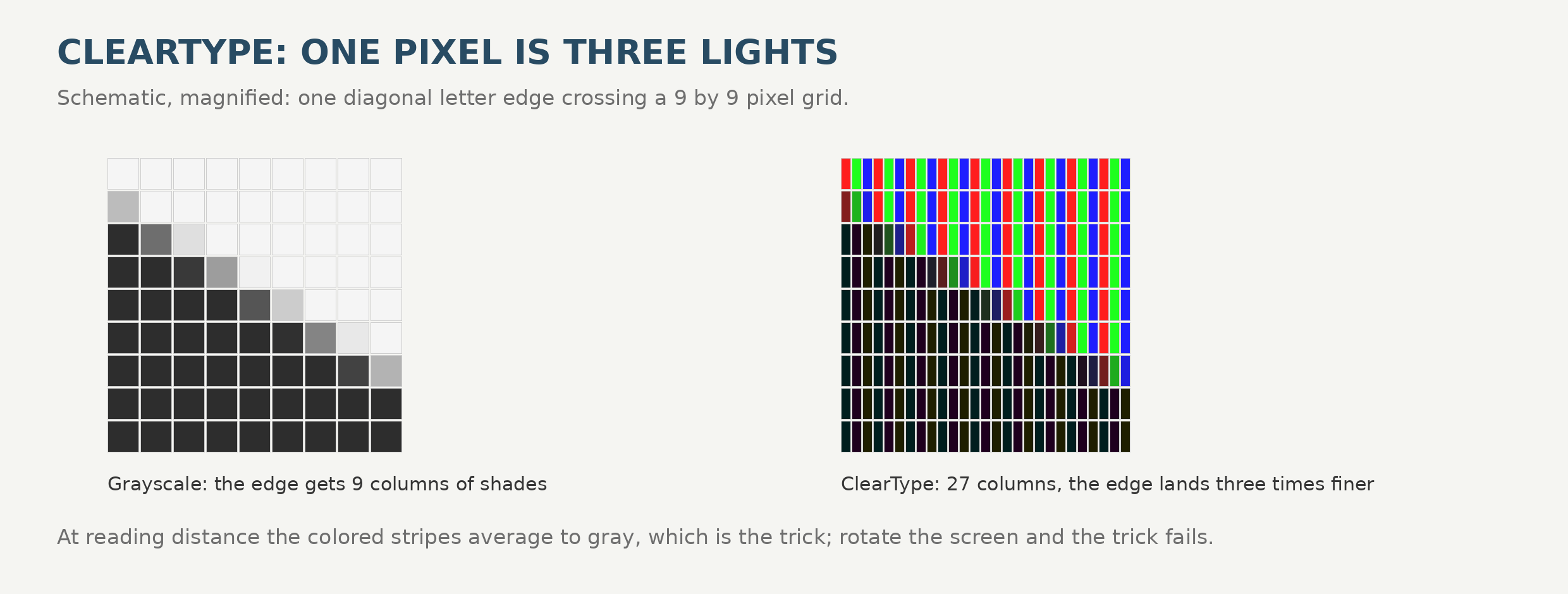
ClearType, introduced with Windows XP in 2001, exploits the physical structure of an LCD: each pixel is three vertical stripes, red, green, and blue, and lighting them separately triples the horizontal resolution available for letter edges. The eye averages the stripes into gray at reading distance; the letterform gets the benefit of the extra detail. That is why ClearType text looks crisp on a standard monitor and develops color fringes on rotated screens, projectors, and OLED panels whose subpixels are arranged differently.
DirectWrite changed ClearType’s defaults in ways users can see. GDI’s ClearType fits glyphs firmly to the pixel grid (strong hinting, whole-pixel spacing in the horizontal direction), which makes small text dark and crisp but subtly distorts letterforms and spacing. DirectWrite’s natural mode positions glyphs at subpixel offsets, preserves the font’s designed spacing, and smooths in the vertical direction as well. Text looks more like the typeface and more like print, sometimes lighter or softer at small sizes, which is why a document can look “fuzzy” in one app and “sharp” in another at the same size in the same font on the same screen: the stacks made different bargains with the pixel grid. Both bargains are legitimate; the argument about which is better has now run for fifteen years and will outlive everyone reading this.
What are the alternatives to DirectWrite?
Fewer than you would expect, and they sort into three kinds. Legacy: GDI with Uniscribe, and GDI+ (the engine under .NET Framework’s System.Drawing), still shipped and serviced, feature-frozen, sensible only for maintaining old code. Wrappers: Skia and Qt bring their own text engines to Windows, but both lean on DirectWrite underneath for font enumeration and glyph generation by default, so they are partly DirectWrite in a coat. Secession: carry a whole stack of your own and use none of it: FreeType plus HarfBuzz (the route Unreal and Godot take on Windows), or, in .NET, SixLabors.Fonts, which shapes and lays out in managed code with no DirectWrite anywhere in the path. DirectWrite is less a product with competitors than a floor: on its own platform you maintain on top of it, wrap it, or leave it entirely. The full cross-platform menu is in our text renderers survey.
What to take away
If you administer Windows machines: fontdrvhost.exe and the UMFD accounts are normal, the font cache is the first suspect when rendering goes globally strange, and keeping systems patched matters because the font bug class, while evicted from the kernel, is not extinct (our rendering engines survey and the color font rendering on Windows post follow the parsers from there). If you make fonts: your hinting is executed by this pipeline, your fallback behavior is decided by DirectWrite’s analyzer rather than the app, and your font is parsed, on a modern system, inside a sandbox, which is exactly where twenty years of evidence says it belongs.