· guides, reference
Font rendering engines: who draws your text
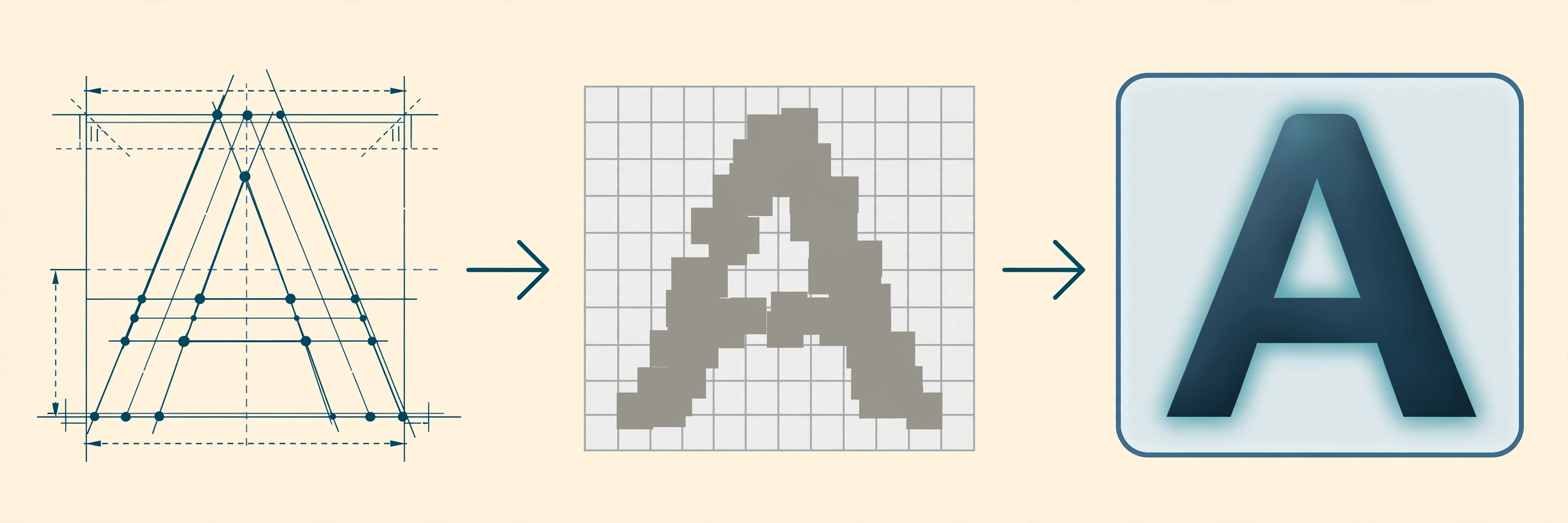
Open the same font, at the same size, in two apps on the same computer, and the letters will not match. One app draws them a shade bolder. In another, the spacing breathes a little differently. Neither app is buggy. They are using different rendering engines, because the idea that “the operating system renders text” is a convenient myth. Every application rides a stack of components that turn characters into pixels, apps pick different stacks, and the stacks disagree about fundamentals: how hard to bend a letter to fit the pixel grid, whether to use the screen’s color subpixels, even how wide a letter is allowed to be.
This post maps the stacks in use today: what the layers are, who supplies them, and why their pixels differ. It is the companion piece to our two hands-on rendering posts, rendering color fonts on Linux and on Windows, which showed what happens when you drive two of these stacks from the command line.
“Rendering” is three jobs, not one
Most arguments about font rendering go wrong at the vocabulary. Turning text into pixels is three separate jobs, usually done by three separate pieces of software:
Decides which glyphs, in which order, at which positions: ligatures, kerning, Arabic joining, line breaks.
Turns each glyph's outline into pixels, bending stems toward the pixel grid as much as its philosophy allows.
Decides how edges soften against the background: subpixel color tricks, grayscale smoothing, gamma.
Shaping comes first. It reads your characters and the font’s OpenType tables and answers: which glyphs, in what order, at what exact positions? Ligatures, kerning, Arabic joining, Indic reordering, all of it happens here. The near-universal shaper is HarfBuzz, which shapes for Chrome, Firefox, Android, the Linux desktop, and most of the open-source world. Note what HarfBuzz’s shaping engine pointedly does not do, per its own manual: it does not rasterize, and it does not break lines. HarfBuzz 14 added experimental raster and drawing libraries outside that shaping core, but the shaper itself still hands a list of positioned glyphs to the next layer. The two big exceptions to HarfBuzz’s reign are the platform stacks that kept their own shapers: Microsoft’s inside DirectWrite, and Apple’s inside CoreText.
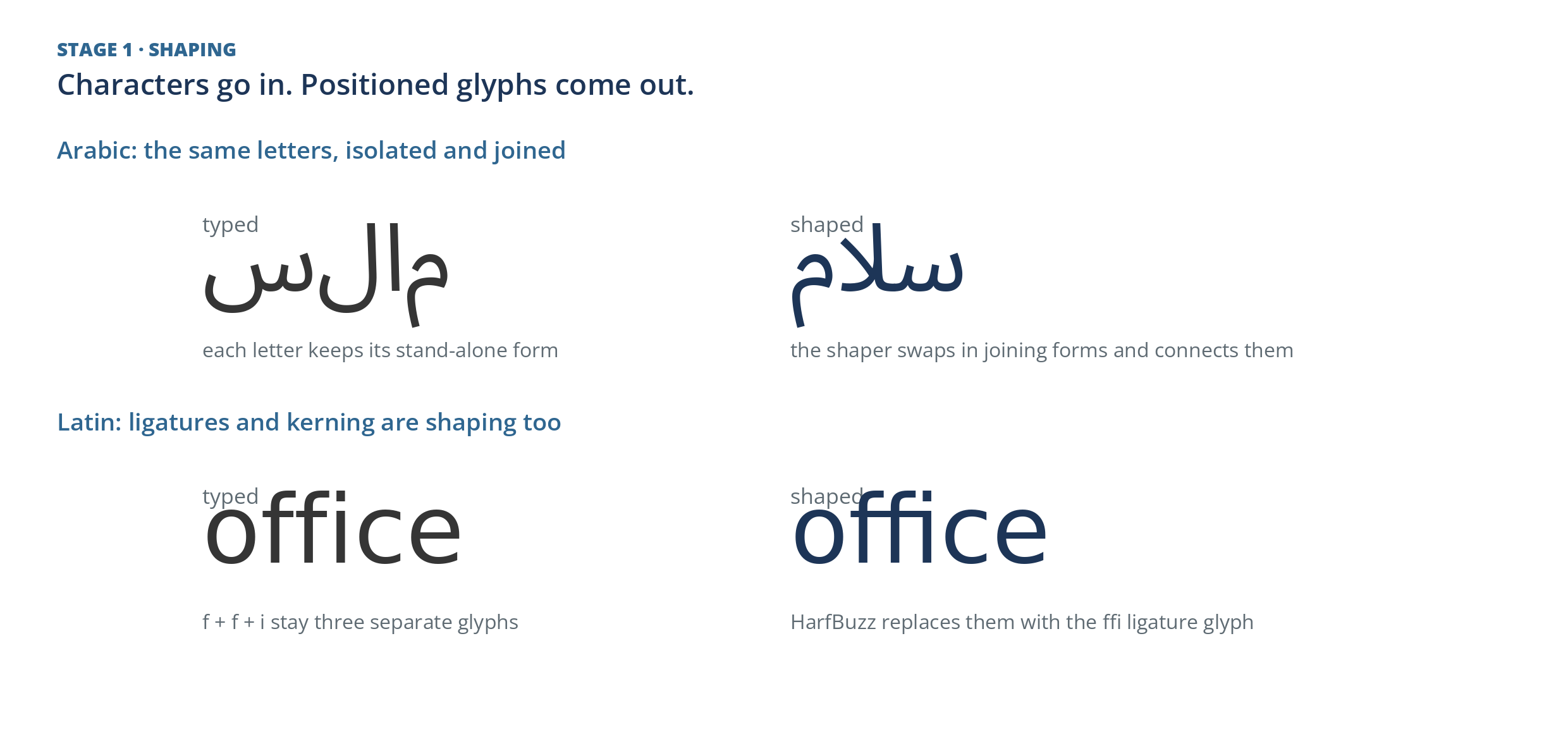
Shaping, drawn by HarfBuzz for this post. Above: Arabic letters keep their stand-alone forms until the shaper swaps in the joining forms the script requires. Below: the ffi ligature is one glyph, not three letters.
Rasterization converts each glyph’s outline into pixels. The open-source default is FreeType, running on Linux, Android, and in more embedded corners than anyone can count. Chrome used to be on that list too, but it has moved off FreeType: Chrome 136 began routing system font handling through Fontations, and Chrome 145 removed FreeType from Blink. Windows uses DirectWrite’s rasterizer, Apple platforms use CoreGraphics, and Skia rasterizes for Chrome and Android surfaces, over Fontations in Chrome’s case and over the platform’s own machinery or FreeType elsewhere.
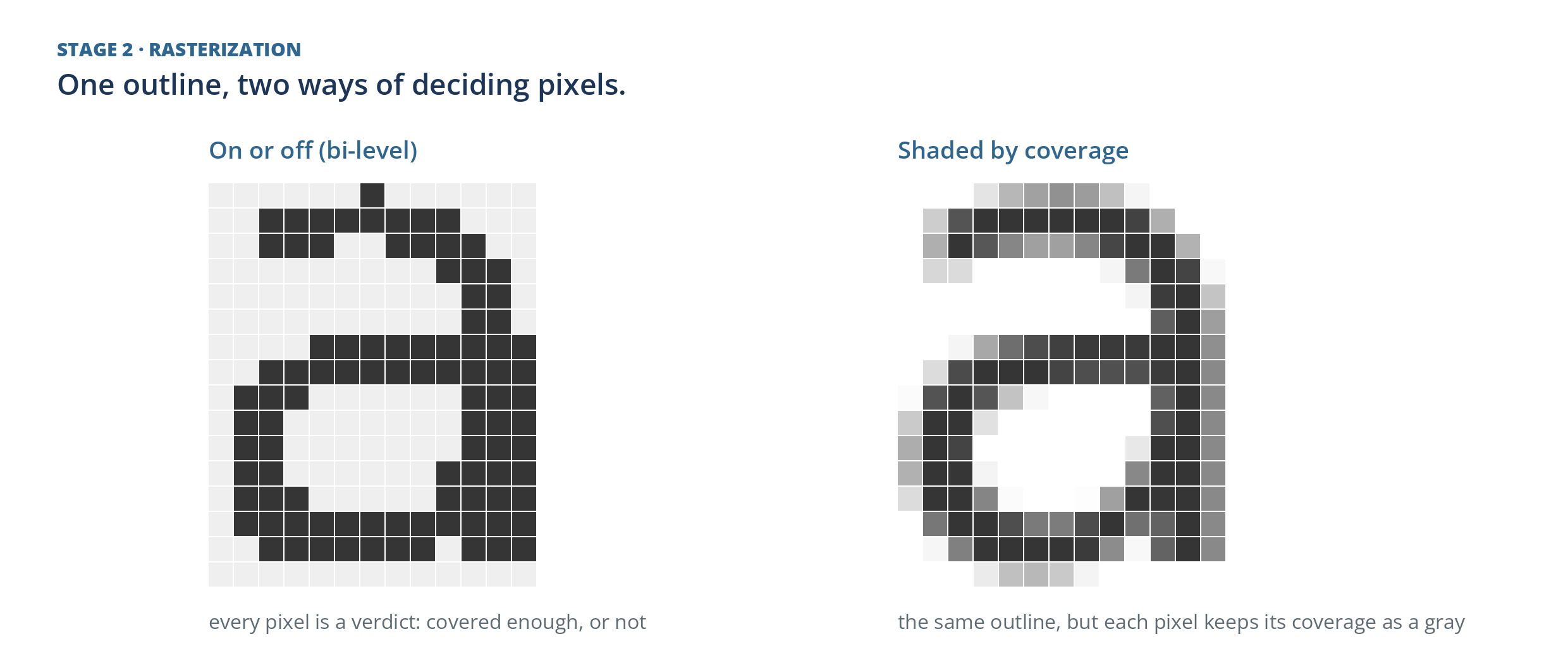
Rasterization: one outline of the letter a at 26 pixels. Left, the bi-level verdict, the oldest and crudest answer. Right, the coverage map every modern rasterizer actually produces, ready for the filtering stage.
Filtering and compositing decide how the hard edges of those pixels soften against a background: whether to exploit the red, green, and blue subpixels of an LCD (ClearType on Windows, FreeType’s LCD filtering on Linux), or to smooth in grayscale only, and at what gamma. Small decisions, enormous visible consequences.
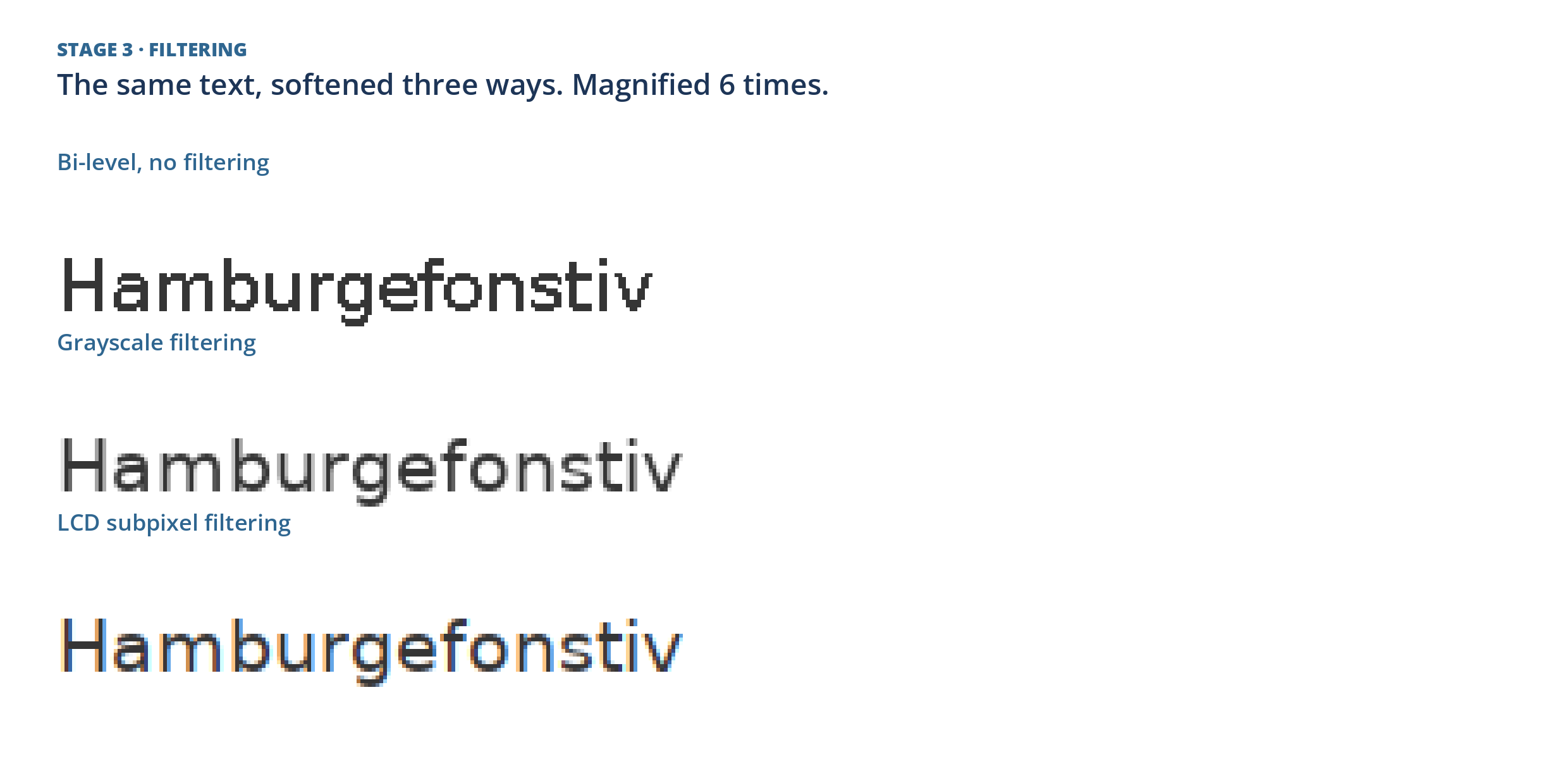
Filtering: the same raster, softened three ways. The LCD row’s color fringes are the subpixel trick caught in the act: each third of a pixel is lit by a different amount, which the eye reads as a sharper edge.
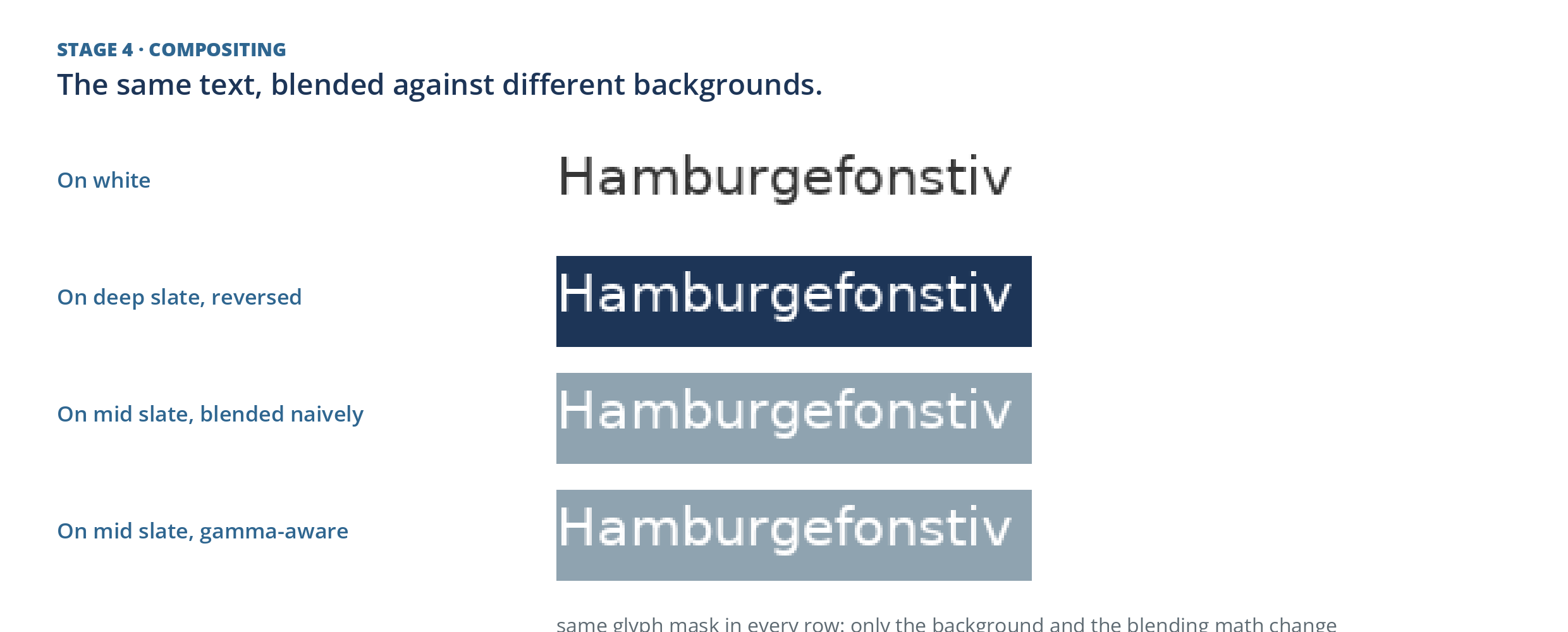
Compositing: a single glyph mask with four destinations. On the mid slate, the naive blend thins the stems; the gamma-aware blend keeps the text’s weight, which is why engines argue about this stage too.
Who draws your text, app by app
Because the stack is assembled per platform and often per app, the honest map of “font rendering today” is a map of applications, not operating systems:
| Where you are reading | The stack doing the drawing |
|---|---|
| Windows, modern apps and browsers | DirectWrite shapes and rasterizes; Direct2D composites |
| Windows, older utilities, WinForms holdouts | GDI, a 1990s stack that never fully left |
| macOS and iOS | CoreText shapes and lays out; CoreGraphics rasterizes |
| Linux desktop | HarfBuzz shapes, FreeType rasterizes, Pango and Cairo assemble |
| Android | Minikin lays out over HarfBuzz and FreeType, behind Skia |
| Chrome, on every platform | HarfBuzz shapes; Skia draws, over Fontations |
| Firefox | WebRender composites; text comes from platform stacks and FreeType |
| WPF applications | DirectWrite underneath |
| Game engines, embedded screens | Their own: glyph atlases, signed distance fields, stb_truetype |
| Server-side image and PDF generation | Whatever the library brought with it |
So a single Windows 11 machine, at this moment, is running at least three text stacks: DirectWrite in the browser, GDI in some aging utility, and FreeType inside any cross-platform app that bundles it. “Windows text” is shorthand, never a fact.
Why the same font looks different
The visible differences trace to one disagreement, carried through all three layers: how much may the engine distort the letter to fit the grid? At small sizes there are not enough pixels to draw the true outline, so every engine picks a side. There are three schools.
Fit the grid. The classic Windows school, born in the GDI era and embodied by ClearType: execute the font’s hinting instructions aggressively, snap stems to whole pixels, keep counters open, and spend the LCD’s subpixels on extra horizontal sharpness. Text is crisp and a little mechanical; letterforms quietly change shape to please the grid.
Fit vertically, stay faithful horizontally. The modern compromise. FreeType’s current interpreter (version 40, the default since 2016) and its “slight” hinting mode snap mostly in the vertical direction and leave widths natural. DirectWrite’s default “natural” measuring does the same kind of thing from the other side: positions glyphs at fractional advances, the font’s true widths, instead of rounding every letter to whole pixels. Less distortion, slightly softer edges.
Fidelity above all. The Apple school: essentially no grid fitting at all. The designer’s outline is drawn as drawn and smoothed in grayscale. On low-density screens this read as blur; on Retina-density screens it reads as print. Apple could afford the philosophy because it controlled the hardware’s pixel density, and it closed the subpixel chapter in macOS Mojave (2018), where subpixel antialiasing stopped being the default.
Here are the three philosophies, drawn by one engine so only the philosophy varies:
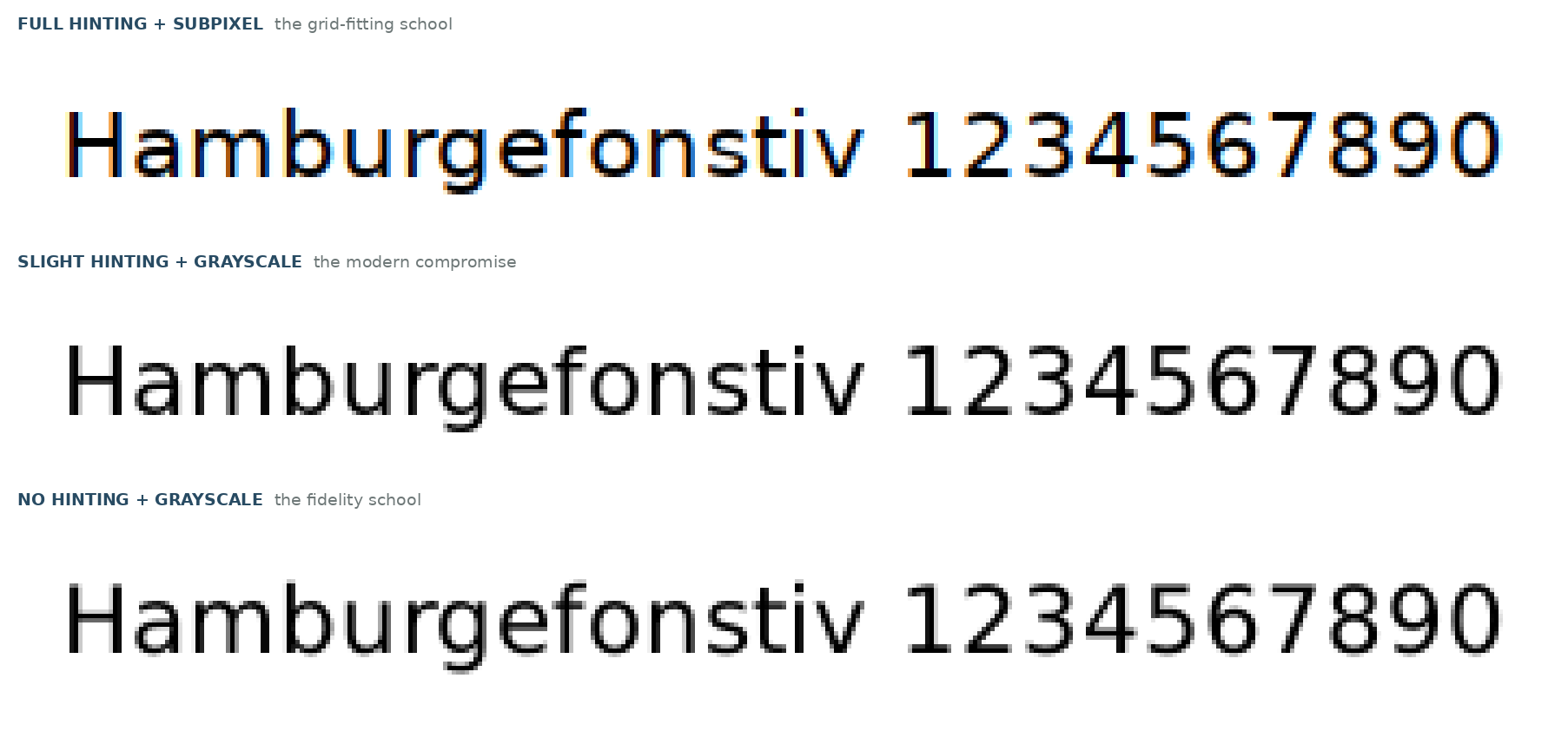
One line of DejaVu Sans at 16 pixels, drawn with Pango and FreeType for this post: full hinting with subpixel antialiasing (the grid-fitting school), slight hinting with grayscale (the compromise), no hinting with grayscale (the fidelity school), each magnified 5 times. These are FreeType drawings demonstrating the philosophies, not screenshots from Windows or macOS.
Drag the slider to compare the two extremes at the same magnification:


Two quieter forces finish the job. Gamma and stem darkening: engines differ in the curve they use to blend edge pixels, and some deliberately thicken thin stems a touch (FreeType offers stem darkening; Skia applies its own). This is most of why text on a Mac reads bolder than the same text on Windows. And subpixel’s limits: the color trick assumes an unrotated LCD with a known stripe order, which is why it fades from use as screens rotate, diversify, and gain pixels. At 200 percent scaling and beyond, plain grayscale has enough pixels to be faithful and crisp at once, which is why the industry’s thirty-year argument is quietly ending.
The independents: bring your own engine
Everything above ships with a platform. A fourth option has matured in the last few years: engines you embed yourself, which answer to no OS. Developers pick them for one reason above all: the same pixels everywhere, on any server, in any container, forever.
- SixLabors.Fonts is the .NET entry, and a genuine full stack in pure managed code: its own shaping (including Arabic, Hebrew, and Indic scripts), its own rasterizer, no native dependencies, running anywhere .NET 8 runs. Per its documentation it loads TrueType, OpenType, CFF/CFF2, WOFF, and WOFF2; it renders color fonts in COLR v0 and v1 with palette selection, plus SVG color fonts; and it instances variable fonts on requested axes. (Its notable gap, shared by most independents: bitmap color fonts, the CBDT and sbix emoji formats, are not in its list. The vector color formats are the ones it covers.)
- SkiaSharp wraps Skia, Chrome’s drawing engine, for .NET. It is the managed shortcut our Windows post used, because Skia carries its own text machinery (HarfBuzz shaping, its own rasterization) into any app.
- fontdue and cosmic-text are the Rust school: fontdue rasterizes glyphs at game-engine speed, and cosmic-text lays out text over the Rust shaping lineage that grew from HarfBuzz’s port, rustybuzz, now continued as HarfRust.
- Fontkit does for JavaScript what SixLabors does for .NET, which is why so much PDF and browser tooling draws text with it.
| Engine | Language | Native code to ship | Pick it when |
|---|---|---|---|
| SixLabors.Fonts | .NET | None | A .NET shop needs identical output on any host |
| SkiaSharp | .NET over Skia | Yes | You want Chrome’s engine inside a .NET app |
| FreeType | C | Yes, one library | You are assembling your own stack anywhere |
| stb_truetype | C, one header file | None | Embedded and games: glyphs with zero ceremony |
| Fontkit | JavaScript | None | Node or browser tooling has to draw text |
| fontdue | Rust | None | A Rust app needs glyphs, fast, without a platform |
How Windows got here, in one strip
Windows deserves a footnote of history, because its present only makes sense as an accumulation:
TrueType reaches Windows 3.1. GDI draws outline text, mostly bi-level: pixels on or off.
ClearType ships in Windows XP: subpixel rendering reaches the desktop, though it is not yet the stock default.
WPF proves subpixel positioning and vertical antialiasing inside an application framework.
DirectWrite lands with Windows 7: natural measuring, grayscale and ClearType modes side by side.
Windows 8.1 adds color glyph runs. The Windows engine now paints, not just shades.
No single Windows renderer: DirectWrite in modern apps, GDI in holdouts, DWriteCore traveling with apps.
Two clarifications the timeline usually gets wrong. First, ClearType in XP was available, not the stock default; plain grayscale smoothing was. ClearType became the default with Vista. Second, there was no Windows 10 measuring-mode flip, however often it is repeated: DirectWrite’s natural measuring was its default from its 2009 introduction. What users actually felt, over years, was application after application migrating from GDI’s classic measuring to DirectWrite at its own pace, each move changing that app’s text overnight. The Windows 8 era added one genuine split: the touch-first Store apps rendered in grayscale while the desktop kept subpixel, the same engine wearing two filtering policies for two kinds of hardware.
Choosing a stack
- Building for one platform: use its stack. DirectWrite, CoreText, or FreeType with Pango are free, maintained by the platform owner, and your text will match everything around it.
- Building cross-platform: pick Skia or an independent engine, and accept one consistent look everywhere in place of a native look anywhere.
- Rendering images on a server: pick for determinism. FreeType and the independents draw the same pixels on any host, which is why our Linux rendering post could build a command-line color font pipeline out of Pango and FreeType, and why a Windows shop might reach for DirectWrite through a binding, or SixLabors instead.
- Color fonts or variable fonts in the product: verify the exact stack, not the OS logo. Support lives layer by layer, as the color font format map and the variable fonts explainer each show from their own angle.
The one-sentence summary of rendering today: shaping has converged (nearly everyone runs HarfBuzz or the platform equivalent), and rasterization is where engines still argue, in pixels you can see. The argument matters less every year, as screens gain the pixels to make every philosophy right. Until then, when text looks wrong, ask not what OS you are on. Ask which stack the app brought.