· explainer
Text renderers compared: what draws your letters
Every letter on every screen is drawn by a text renderer: software that loads a font, shapes characters into positioned glyphs, lays them out in lines, and paints the pixels. You have never chosen most of the renderers you use. Your operating system picked for you, your browser second-guessed the OS, and the apps that embed their own engines picked a third time. This post maps the whole field: what each platform defaults to, what a developer can embed instead (open source or commercial), and why the commercial market, which looks like it should not exist next to free giants, survives in exactly four pockets.
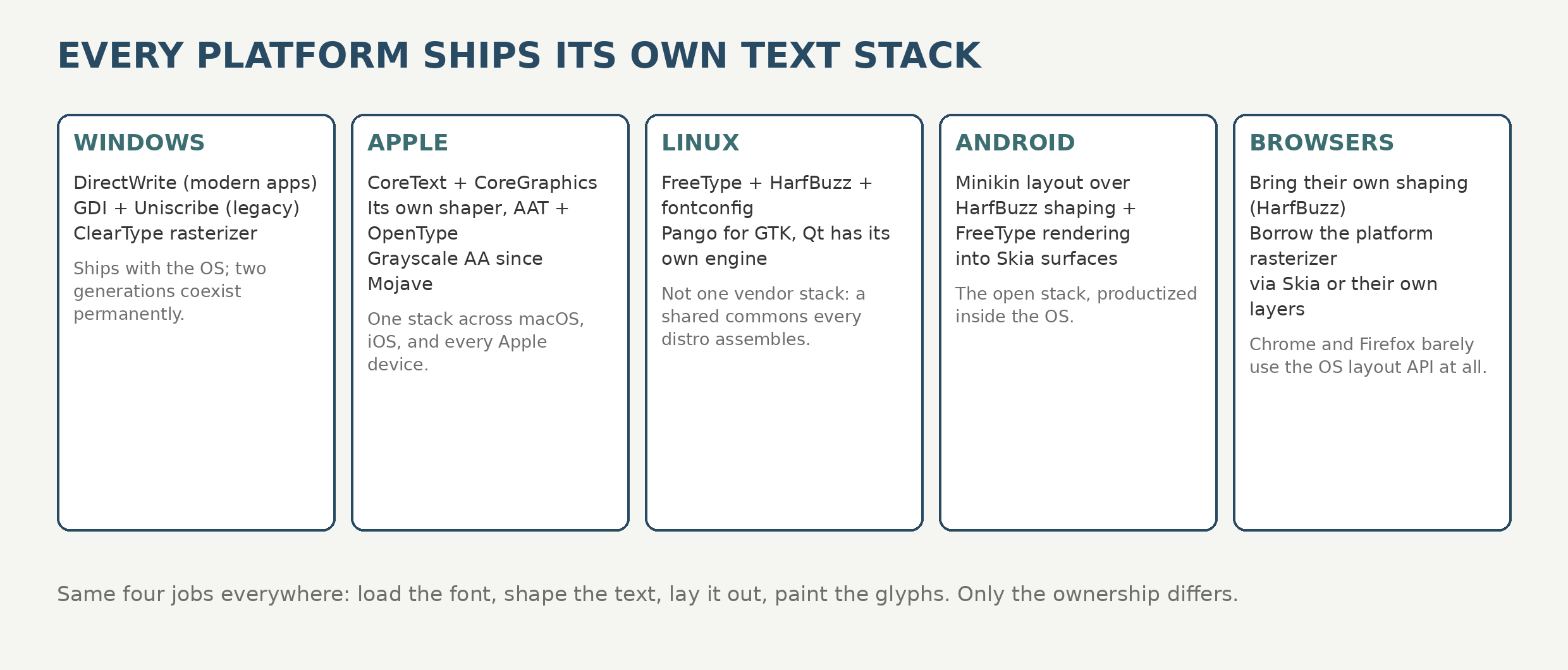
What each OS defaults to
Windows: DirectWrite, with GDI underneath. Modern Windows text runs through DirectWrite (its own shaper, ClearType rasterization, Direct2D drawing), and the 1985 GDI stack with Uniscribe still serves legacy software; GDI’s XP-era successor GDI+ still ships too, and lives on most consequentially as the engine under .NET’s System.Drawing, which is why that library is Windows-only today. The full pipeline, including the years font parsing spent in the kernel and the sandbox that replaced it, is in our Windows rendering explainer.
Apple: CoreText, everywhere. macOS, iOS, and every Apple device use CoreText for shaping and layout over CoreGraphics rasterization (grayscale antialiasing only; subpixel rendering was dropped in macOS Mojave). No alternative stack is offered.
Linux: a commons, not a vendor. No company owns the Linux text stack, so the world built one in the open: FreeType loads and rasterizes fonts, HarfBuzz shapes, fontconfig finds and matches fonts, and higher layers assemble them: Pango does paragraph layout for GTK apps, and Qt ships its own text engine that delegates shaping to HarfBuzz and fonts to the platform. ChromeOS is this stack plus Chrome, though Chrome itself has now moved off FreeType: Chrome 136 began routing system font handling through Fontations, and Chrome 145 removed FreeType from Blink.
Android: Minikin. Android’s internal layout library, Minikin, wraps HarfBuzz shaping and FreeType rasterization and feeds Skia; app developers meet it through the framework text APIs and Jetpack Compose.
Browsers cheat. Chrome and Firefox mostly refuse the OS layout API: both shape with HarfBuzz on every platform and borrow only the platform’s font backend and rasterizer (through Skia in Chrome’s case, its own graphics layer in Firefox’s). A web page’s text is therefore rendered by the browser’s chosen stack, not your OS’s, which is why the JavaScript font engines exist at all: the browser will draw text for you, but it will not tell you anything about the font.
The five steps of rendering, compared
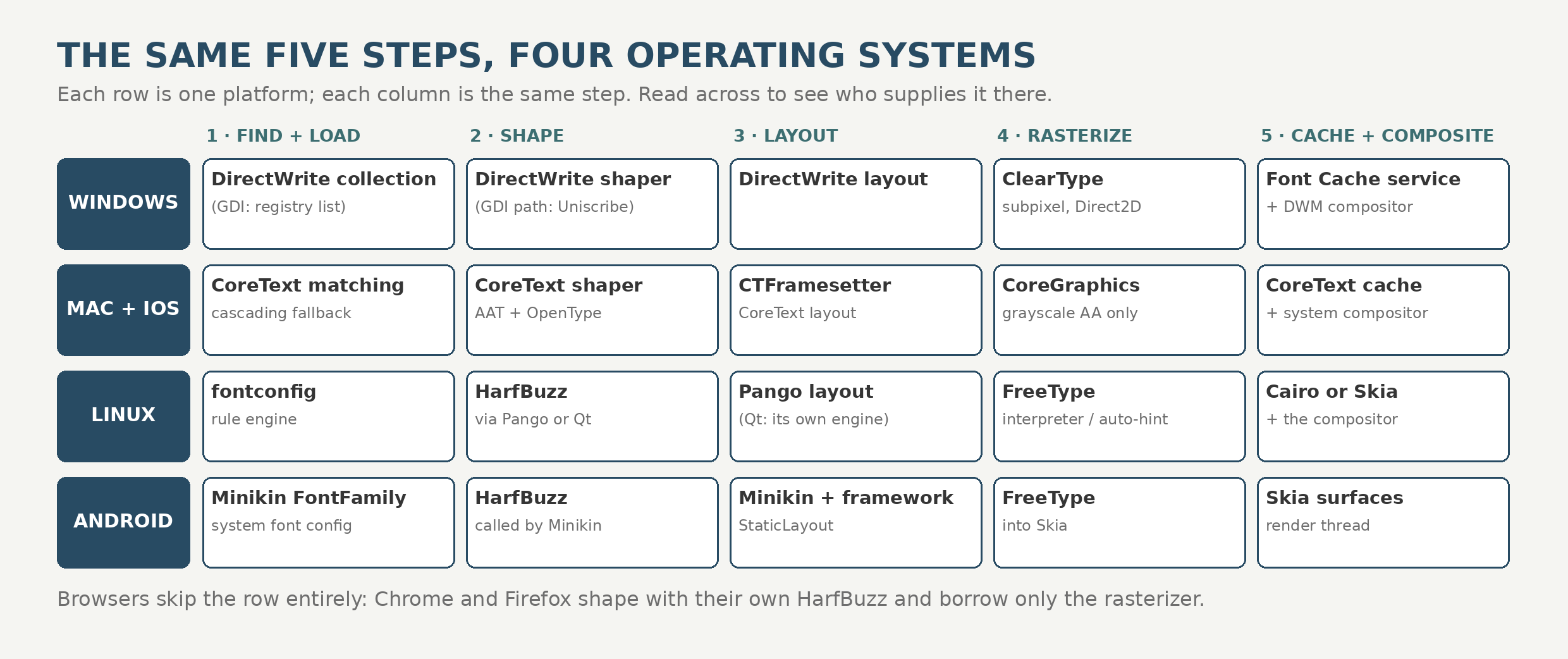
Every stack above performs the same five steps. What differs is who wrote each step, and how much of it you are allowed to replace.
Step 1: Find and load the font. Before any letter can be drawn, the system must decide which file on disk a request like “bold sans, preferably with Arabic” means. Windows answers from the DirectWrite font collection, Apple from CoreText’s matching and cascading fallback lists, Linux from fontconfig (a rule engine over the installed files, which is why Linux fallback behavior is famously configurable and famously surprising), Android from Minikin’s font family configuration, and Rust stacks from fontdb-style system scans. Loading itself is lazy everywhere that matters: tables are read on demand, because a CJK font can carry twenty thousand glyphs nobody is about to draw.
Step 2: Shape. If you are new to this: shaping is the step that turns a string of characters into the right glyphs, in the right forms, in the right order. A font file does not contain “the letter, ready to print”; it contains drawings plus rules, and the shaper is the interpreter. In Latin it quietly merges fi into a ligature and kerns AV tighter. In Arabic it is not optional decoration: letters take different forms depending on their neighbors and join like handwriting, and in Indic scripts characters reorder and merge into clusters. Skip shaping and Latin looks slightly crude, while Arabic comes out as disconnected isolated letters, which is to say wrong.
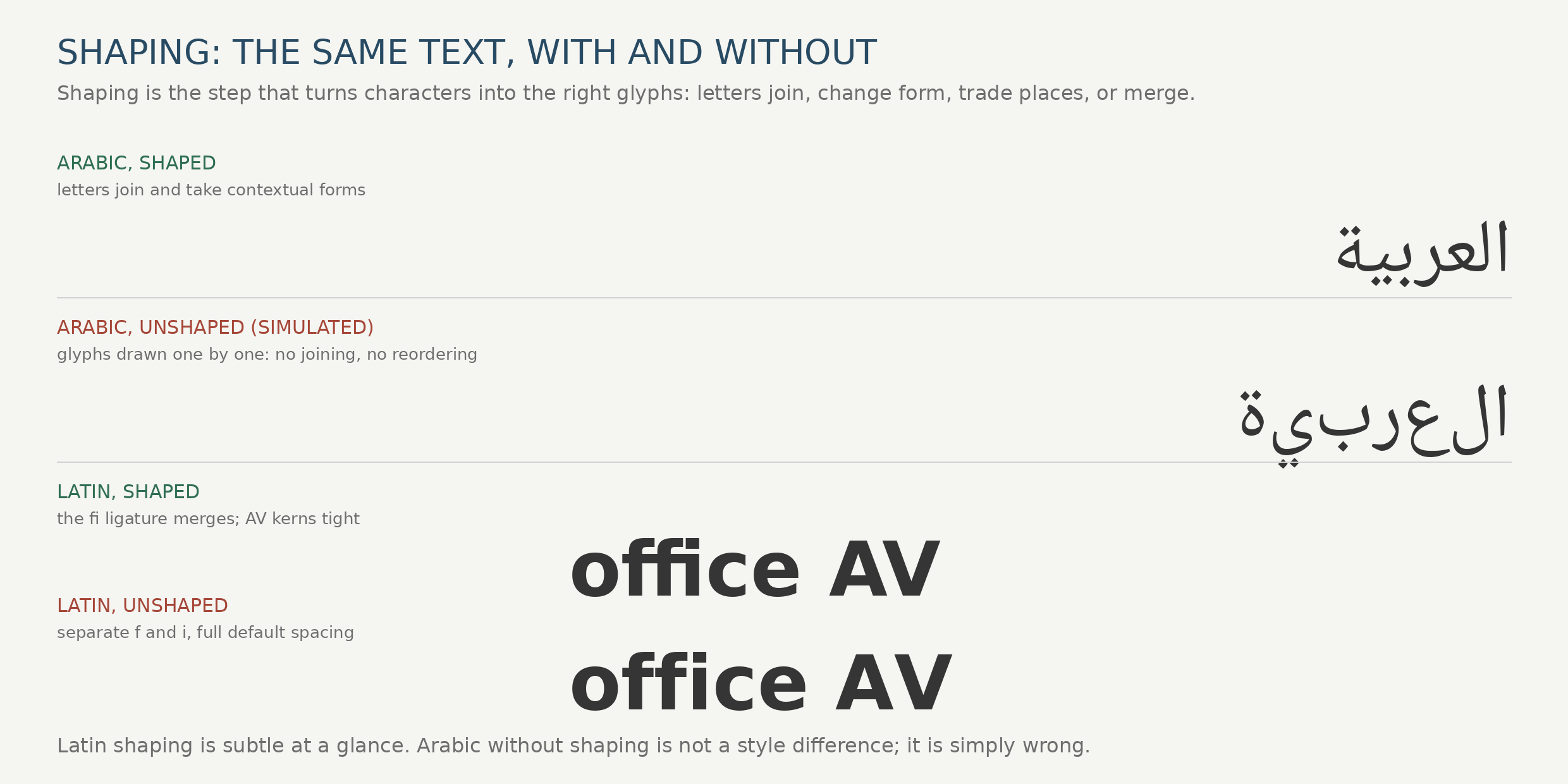
Formally: the shaper applies the font’s GSUB substitutions and GPOS positioning, breaks text into script runs, and orders bidirectional text. This step has a near-monopoly supplier: HarfBuzz shapes for Chrome, Firefox, Android, Pango, Qt, and most of the open world. The exceptions are the platform stacks that insist on their own (DirectWrite’s built-in shaper, CoreText’s shaper) and the rare independent engines (SixLabors.Fonts shapes with its own GSUB/GPOS implementation). Shaping is the step where correctness is measured in decades of edge cases, which is why so few attempt it.
Step 3: Lay out. Shaped runs become lines: breaking at legal points (UAX 14), justifying or aligning, resolving per-character fallback when a glyph is missing, and computing the metrics an editor needs (caret positions, selection rectangles, hit testing). This is the least standardized step. Pango and Minikin exist precisely to do it; DirectWrite and CoreText ship layout APIs alongside their shapers; FreeType and HarfBuzz deliberately stop before it, which is why “I will just use FreeType” projects discover, mid-build, that they have signed up to write a layout engine.
Step 4: Rasterize. Outlines become pixels at a specific size, and this is where engines visibly disagree. FreeType scan-converts with either its TrueType bytecode interpreter (execute the font’s own hinting instructions) or its auto-hinter (improvise equivalent fitting for unhinted fonts). DirectWrite rasterizes with ClearType subpixel positioning and its natural spacing philosophy; CoreGraphics paints grayscale only, Apple having decided that high-density displays made subpixel tricks unnecessary. Skia rasterizes into glyph atlases and can keep distance fields instead of bitmaps for text that must scale and rotate, and game engines pushed that furthest (the browser version of this problem gets its own post, Text in WebGL and WebGPU): TextMeshPro pre-bakes the distance fields and never rasterizes at runtime at all, while Slug evaluates the Bézier curves themselves on the GPU per pixel. Same step, five genuinely different answers to “what is a pixel of text.”
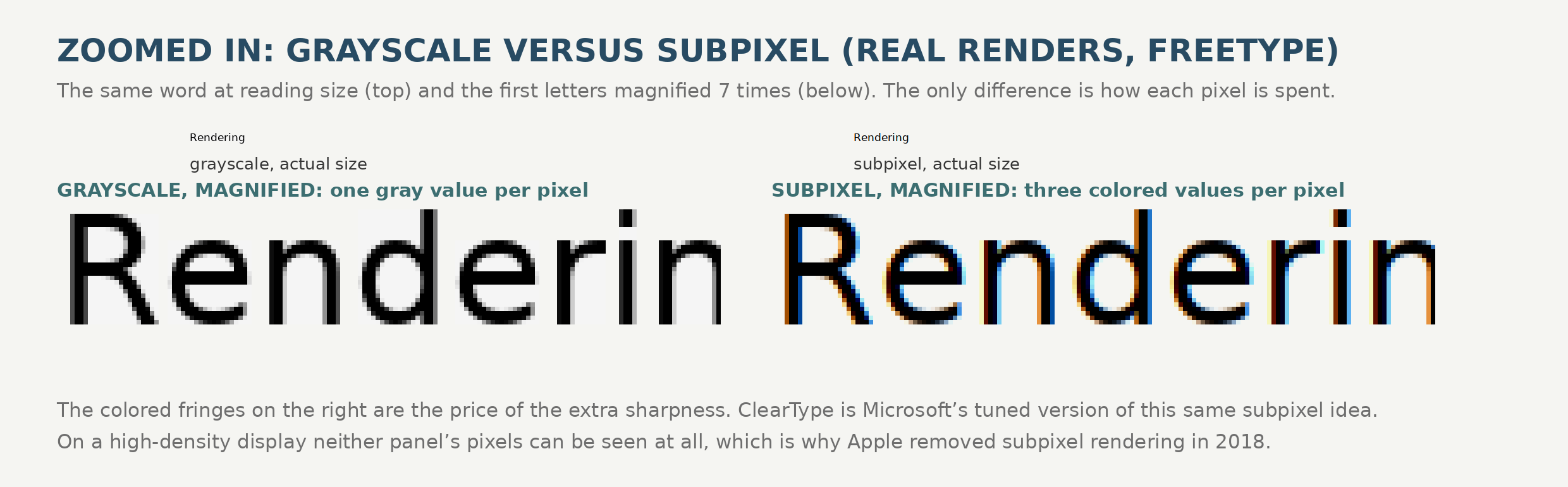
Step 4 is also where the industry’s longest argument is quietly ending. Subpixel rendering was a low-density technology: tripling horizontal resolution mattered at 96 DPI and costs visible color fringing forever. At modern densities (roughly 220 DPI on laptops, 400 and up on phones) grayscale antialiasing alone is clean, the fringes are pure cost, and the vendors have voted accordingly: Apple removed subpixel rendering in macOS Mojave in 2018 and never had it on iOS, Android renders most text grayscale through Skia, and DirectWrite’s grayscale and natural modes are the modern Windows default in most new apps. Classic ClearType survives where low-DPI desktop monitors survive, which is a great many offices. (Dithering, the other trick for faking shades, belongs to the display rather than the renderer: it is how 1-bit e-ink screens and cheap panels pattern the few values they have, not something modern font engines do to text.)
Step 5: Cache and composite. Nobody rasterizes the same glyph twice if they can help it. Renderers cache glyph bitmaps (browsers and Unreal in texture atlases, operating systems in font caches like the Windows Font Cache service), and the finished text surface is composited with everything else (by the Desktop Window Manager on Windows, the compositor or GPU elsewhere). Most real-world “the text looks different” mysteries live in steps 4 and 5: hinting choices, subpixel geometry, and cache staleness, not in the font.
| Step | The usual supplier | Who insists on their own |
|---|---|---|
| Find and load | fontconfig (Linux), DirectWrite collection, CoreText matching | Rust stacks scan with fontdb; browsers enumerate through their own backends |
| Shape | HarfBuzz, nearly everywhere | DirectWrite, CoreText, SixLabors.Fonts |
| Lay out | Pango, Minikin, DirectWrite, CoreText | Anyone building on FreeType plus HarfBuzz writes or borrows this step (libraqm) |
| Rasterize | FreeType (open world), ClearType (Windows), CoreGraphics (Apple) | Skia (atlases and distance fields), Slug (GPU curves), ImageSharp.Drawing (managed scanline) |
| Cache and composite | OS font caches, glyph atlases, the system compositor | Games pre-bake everything (TextMeshPro) |
Build your own: the open source menu
A developer who needs text inside their own product (a game, a design tool, a PDF generator, a renderer like a font site’s specimen service) assembles from a well stocked shelf:
| Engine | Language | What it gives you | License |
|---|---|---|---|
| FreeType | C | Loading and rasterization for nearly every font format ever shipped, hinting interpreter, auto-hinter. No shaping, by design | FreeType License or GPLv2 |
| HarfBuzz | C++ | The reference OpenType shaper: every script, GSUB/GPOS, variable fonts, subsetting. No rasterizer in the core | MIT-style |
| libraqm | C | FreeType plus HarfBuzz plus FriBidi pre-assembled into one layout call; the reason Pillow does proper Arabic | MIT |
| Pango | C | Full paragraph layout (itemization, bidi, line breaking, fallback) over HarfBuzz and fontconfig | LGPL |
| Skia | C++ | A complete 2D engine with its own text stack, glyph atlases, GPU rendering; powers Chrome, Android’s canvas, Flutter | BSD |
| rustybuzz + swash + cosmic-text | Rust | HarfBuzz ported to safe Rust; shaping, rendering, and a batteries-included layout library from the COSMIC desktop | MIT / Apache |
| go-text/typesetting | Go | A HarfBuzz-derived shaper and layout in pure Go, used by the Gio and Fyne toolkits | BSD / MIT family |
| SixLabors.Fonts | C# | Loading, shaping, and layout in fully managed code, rasterization via ImageSharp.Drawing; covered in depth in our breakout post | Split License (see breakout) |
Game engines show the shelf in production, split along one fault line. Unreal vendors FreeType (and HarfBuzz for shaping) and rasterizes glyphs into a texture atlas at runtime. Godot builds on FreeType, HarfBuzz, and ICU behind its TextServer. Unity’s TextMeshPro refuses runtime rasterization entirely: fonts are pre-baked into signed distance field atlases, and a shader rebuilds crisp edges at any size, the approach Valve described in 2007 turned into the industry default for game UI.
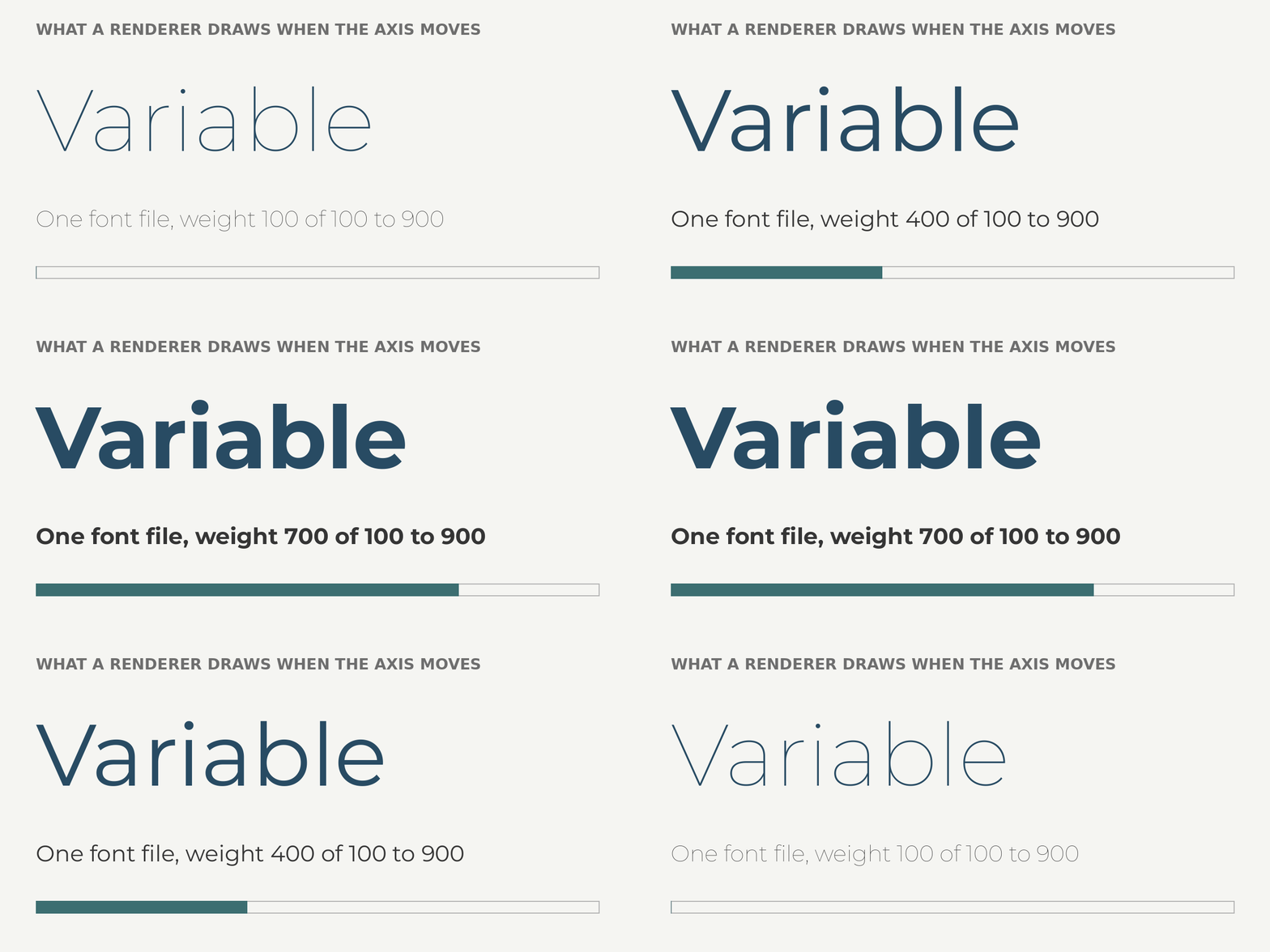
That animation is the modern renderer’s party trick and its burden: one font file, every weight, and the engine must interpolate outlines and repaint continuously, which is why variable font support separates current engines from museum pieces.
The commercial shelf, and why it is so short
Commercial text engines exist, but the market is narrow, old, and concentrated where free software fits badly.
Monotype is the market. Its embedded line (the iType font engine, the WorldType layout engine and shaper, and the Spark pair re-architected for tiny hardware) is licensed into car dashboards, printers, e-readers, wearables, and medical devices. The Spark shaper was quoted at roughly 118 KB of code and 5 KB of runtime RAM: that footprint, plus certified script coverage, patent-clean hinting, and a support contract with indemnification, is the product. Monotype also keeps absorbing the industry: it bought Bitstream’s font business in 2012 (killing the rival Font Fusion and Panorama engines as standalone products) and Japan’s Fontworks in 2023, because the real bundle being sold is engine plus licensed typefaces plus one throat to choke.
D-Type is the surviving independent: a modular commercial C/C++ suite (font engine, rasterizers, text layout, a Unicode engine) pitched at embedded and cross-platform products that want no open source dependencies and a vendor to call.
Slug was the games entry: Eric Lengyel’s library renders text on the GPU directly from Bézier curves, no atlases, no distance fields, and major studios licensed it for a decade. Then the moat drained in public: in March 2026 Lengyel dedicated the Slug patent to the public domain and published reference shaders under MIT, and HarfBuzz’s experimental GPU library already implements the algorithm. The supported library is still sold, but Slug is now the cleanest case study of a commercial renderer’s advantage evaporating.
Scaleform GFx, Autodesk’s Flash-based game UI middleware, was discontinued in 2017, dying with Flash. Harlequin, from Global Graphics (now Hybrid Software), holds the print end: a proprietary RIP core inside high-end digital presses, where a rendering error is not a visual bug but a ruined print run, and OEMs still pay for guaranteed output.
The pattern across all of it: commercial engines survive in four pockets (severely constrained embedded hardware, print, games, and deals bundled with font libraries) and nowhere else. On desktop and mobile, between the OS stacks and the free commons, there is simply no room left to charge for drawing letters. Every commercial vendor above either started in one of the pockets or has already been acquired or discontinued.
How to choose
Use the OS stack when you are building a normal app; it is native, maintained, and free. Reach for FreeType plus HarfBuzz (or Raqm, when you want them pre-assembled) when you are building a renderer of your own and need every format and every script. Take Skia when you need a whole 2D engine, GPU included. Take the Rust or Go stacks when your product already lives in those languages. Take SixLabors.Fonts when you are in .NET and want one managed codebase (the breakout post covers exactly where it wins and where it cannot go). And pay Monotype or D-Type when a lawyer, a certification, or a chip with kilobytes of RAM makes the decision for you.