· guides, reference
Rendering color fonts on Linux
This post is a byproduct. While building our color fonts explainer, we needed specimen images rendered from real color font files on a headless Linux box: no desktop, no display, just scripts. Every specimen in that post exists because the pipeline below eventually worked, but “eventually” did some lifting. The obvious tools each failed in a different, silent way, and the fix turned out to be a virtual display and a viewer most people only use for debugging. If you are building anything that renders color fonts server-side (specimen generators, thumbnail services, QA tooling, font catalogs), this is the map of the potholes, drawn by someone who hit all of them in one evening.
The two pictures that frame the problem
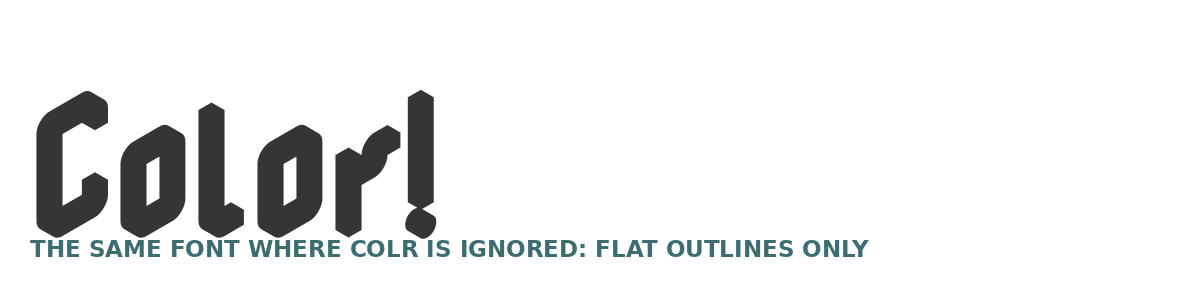
Same font (Nabla, a COLR v1 display face), same word, same machine. This is what PIL, Python’s standard imaging library, produced:
And this is what the font actually contains, rendered by the recipe at the bottom of this post:
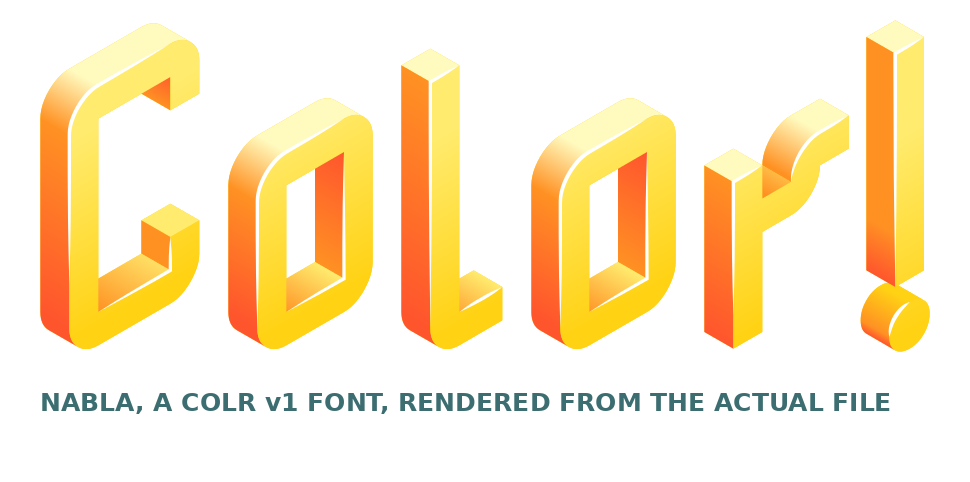
Nothing about the first image is an error. PIL loaded the font, shaped the text, and drew the glyphs. It simply never looked at the color tables, because PIL’s text rendering reads the plain outline table and has no concept of COLR layers, gradients, or palettes. Any pipeline that renders fonts with PIL and assumes the output is faithful will publish the black version and never know. That silence is the recurring theme of this whole exercise: color rendering failures on Linux do not crash. They quietly produce monochrome.
What each tool actually does with a color font
PIL / Pillow: bimodal. For bitmap color fonts (CBDT, which is what Google’s Noto Color Emoji is), PIL is genuinely good: font.getmask aside, drawing with embedded_color=True renders the stored pictures in full color, and our emoji specimens were made exactly that way. For COLR (v0 or v1) or OpenType-SVG, PIL draws the monochrome outlines and says nothing. Know which format your font carries before choosing it (the inspection snippet below tells you in four lines).
pango-view: the Pango text viewer is the right engine (Pango shapes with HarfBuzz, paints with Cairo, and Cairo understands COLR layers and gradients). But pango-view is a desktop program at heart. Run it on a headless box, even with an output file specified, and it stops at:
pango-view: Cannot open displayAdding --backend=cairo did not save it in our build; it wanted a display anyway. One dead end.
hb-view: HarfBuzz’s own viewer renders color glyphs too, and on many systems it is the cleaner answer. It was not installed on our box, and the package sources available to us did not offer it. Worth checking on yours before falling back to the recipe below: which hb-view.
fontconfig palette syntax: a tempting shortcut. Fonts like Nabla carry multiple CPAL palettes, and fontconfig patterns accept a :palette= element, so we rendered three files with --font="Nabla:palette=1" (and 2, and 4), hoping to get the alternate color schemes. The outputs came back byte-identical in size, with a fraction of the colors of the true render. In this stack the element is ignored, and the result is silently degraded. Palette selection, in the end, belongs to the CSS font-palette layer or to code that paints COLR layers itself. More in the last section.
The working recipe
Pango needs a display. Give it a fake one. Xvfb (the X virtual framebuffer) is a display server that renders into memory, and xvfb-run wraps any command with one:
xvfb-run -a -s "-screen 0 1600x900x24" \
  pango-view --font="Nabla 120" -t "Color!" \
  -o nabla.png --dpi 200
That single command produced the golden specimen above. The details that matter:
-alets xvfb-run pick a free server number, which keeps parallel renders from colliding.- The explicit screen size and 24-bit depth give Cairo a real canvas; undersized screens crop large type without complaining (another silent failure: our first runs at default geometry were fine only because the text was small).
-ois not optional in practice. Our very first xvfb attempt, run without a firm output-and-exit path, sat there until we killed it at about 100 seconds. With-oand atimeout 30around test invocations, every run since has finished in seconds. Treat the timeout as scaffolding: keep it until your pipeline has earned trust.--dpiplus the point size in--fonttogether set the pixel size. For specimen work, render bigger than you need and downscale in post; Cairo’s gradient rendering is cleaner for it.
Two pipeline refinements followed immediately. First, for batch work, start one persistent server (Xvfb :99 -screen 0 1600x900x24 &, then export DISPLAY=:99) instead of paying xvfb-run’s startup cost per image. Second, pango-view renders come with generous white margins; trim them programmatically with the PIL difference trick:
The routing table below is the whole decision in one view; the companion post, Rendering color fonts on Windows, shares it and covers the DirectWrite side.
from PIL import Image
import PIL.ImageChops as Chops
im = Image.open("nabla.png").convert("RGB")
bbox = Chops.difference(im, Image.new("RGB", im.size, (255, 255, 255))).getbbox()
im.crop(bbox).save("nabla-trimmed.png")
Verify the render is color, mechanically
Do not eyeball it. Count colors. A true COLR v1 render of a gradient font contains thousands of distinct colors; a silently-mono render contains a few hundred antialiasing greys at most:
from PIL import Image
im = Image.open("nabla.png").convert("RGB")
print(len(im.getcolors(maxcolors=10_000_000)))
# real Nabla render: 3601. Flat fallback renders of the same text: ~256.
That one check, wired into the pipeline as an assertion, is the difference between a specimen service and a future embarrassment. The thresholds that worked for us: bitmap emoji renders also score in the thousands; any “color” render under a few hundred distinct colors is monochrome until proven otherwise.
Pre-flight: read the font before rendering it
Four lines of fontTools tell you which tables a font carries and therefore which renderer can possibly succeed:
from fontTools.ttLib import TTFont
f = TTFont("Nabla.ttf")
print([t for t in ("COLR", "CPAL", "SVG ", "CBDT", "sbix") if t in f])
print("COLR version:", f["COLR"].version if "COLR" in f else None)
print("palettes:", len(f["CPAL"].palettes) if "CPAL" in f else 0)
# Nabla: ['COLR', 'CPAL', 'SVG '] · COLR version 1 · 7 palettes
Route on the result: CBDT or sbix present, PIL is fine and fast; COLR present, go the Xvfb route; SVG-only, neither of these pipelines will give you color, and you are in browser-engine territory (headless Chromium understands the SVG table and font-palette both).
One more installation detail: fonts dropped into ~/.local/share/fonts/ are found by fontconfig (and therefore Pango) automatically in most setups. If a renderer insists a freshly copied font does not exist, fc-cache -f is the nudge.
The wall we did not climb
Honesty section, because someone will build on this: selecting a non-default CPAL palette from the command line is unsolved in this stack. fontconfig’s :palette= was ignored by pango-view (above), and Pango’s own tooling exposes no palette flag. The routes that do work are a real browser engine (CSS @font-palette-values plus headless Chromium screenshots) or painting the COLR layers yourself with a library that exposes them, such as HarfBuzz’s color APIs through its language bindings. For our specimens, palette 0 was the designer’s default and entirely presentable, so we shipped that and rendered the font’s other six palettes as a swatch chart read straight from its CPAL table with fontTools instead (you can see it in the explainer). Know which of your requirements is palette-shaped before you pick the stack.
The short version
- Color font failures on Linux are silent and monochrome. Assert on color counts, not exit codes.
- PIL renders bitmap color (CBDT emoji) well and COLR not at all.
- pango-view is the right engine for COLR v0 and v1, and it needs a display:
xvfb-run -awith an explicit screen, an-ooutput file, and a timeout while you are still testing. - Read the font’s tables with fontTools first, and let the format choose the renderer.
- Palette switching is a browser-layer feature. Plan accordingly.
The pipeline that came out of this now renders every color specimen this site needs. The potholes are all still there for the next team; hopefully this saves them an evening.
 Pillow (PIL) documentationThe bitmap-color renderer and trimming tool from this pipeline. Remember embedded_color=True.Visit site
 fontTools documentationThe inspection and instancing library behind every pre-flight check in this post.Visit site