· rendering, webgl, webgpu, shaders, sdf
Rendering text in WebGL and WebGPU
WebGL has no text support whatsoever: the API draws triangles and samples textures, and that is the entire vocabulary. There is no font to load, no string to draw, no shaping call. Every letter you have ever seen inside a WebGL scene, in a browser game, a product configurator, or a map, was smuggled in by one of four tricks, and WebGPU, its successor, is now rebuilding the same craft on newer machinery.
Trick 1: let Canvas do it, then take a photograph
The pragmatic route: draw the text with Canvas 2D, where the browser’s real text stack lives (the platform shaper, the platform rasterizer, everything from our text renderers survey), upload the canvas as a texture, and map it onto a rectangle in the scene. This is honest, high-quality text, because a real text engine made it.
The catch is that it is a photograph of text. It is fixed at the resolution you rendered it, fixed in content, and expensive to update, because every change means a new canvas render and a new texture upload. It is the right answer for labels that rarely change and the wrong one for anything live, zoomable, or long.
Trick 2: the bitmap atlas, games’ first answer
The classic game approach: pre-render every glyph you need, once, into one large texture called an atlas, at one chosen size. Text becomes a strip of textured rectangles, one per glyph, positioned by advance widths the CPU computed. It is fast, simple, and completely rigid: the atlas holds the characters you baked, at the size you baked them, and text drawn larger, smaller, or rotated shows it.
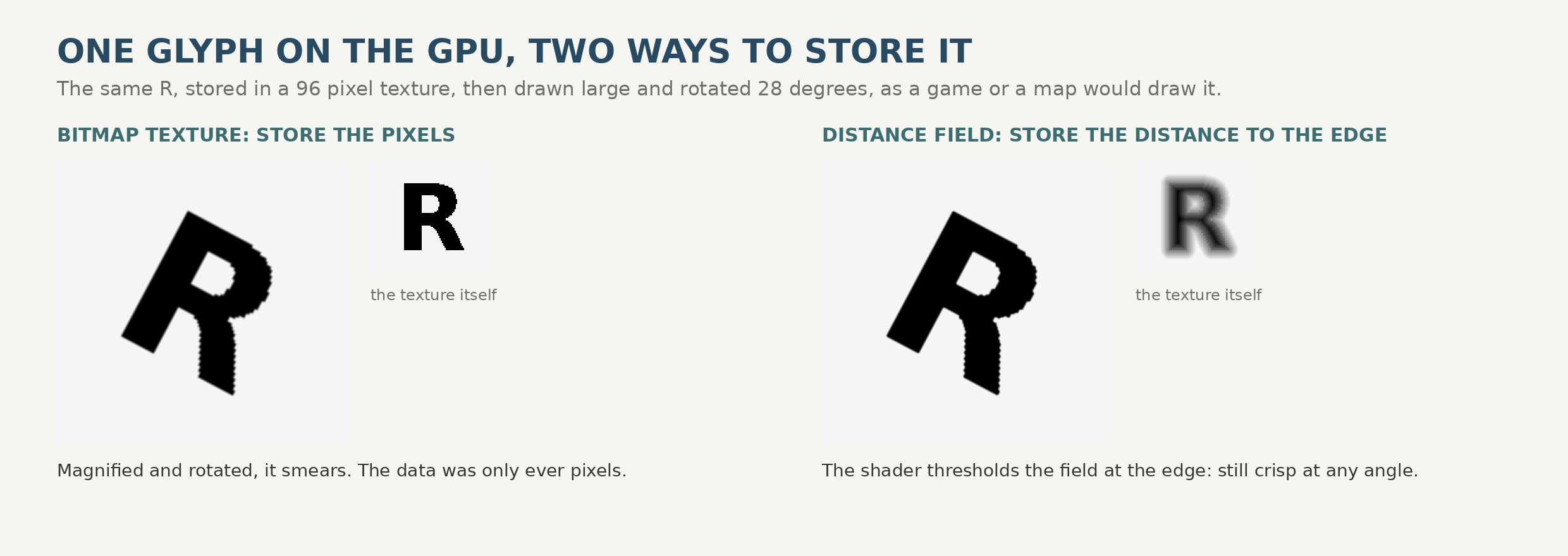
Or try it live. The demo below is real WebGL running in your browser right now: the same letter R in a 128 pixel texture, drawn by an actual fragment shader. Switch between the bitmap texture and the distance field, and drag the angle and size sliders. In bitmap mode the letter falls apart exactly as the plate shows; in distance field mode it does not.
Live WebGL in your browser: one 128 pixel texture of the letter R, drawn by a fragment shader. The distance field mode thresholds the field at the edge; the bitmap mode just samples pixels.
Trick 3: distance fields, the professional answer
A signed distance field stores something smarter than pixels: for every point in the texture, the distance to the nearest glyph edge, signed by which side of the edge it is on. The texture looks like a soft halo around the letter. In the fragment shader, a few lines of code threshold that field at the edge value, with a smoothing width that adapts to the on-screen size, and reconstruct a clean edge at essentially any scale or angle. The plate above is computed, not drawn: the same R, the same 96 pixel texture budget, rotated 28 degrees both ways. The bitmap smears because pixels are all it ever had; the field stays crisp because the edge’s location is encoded in every value.
This is the technique the industry settled on. It descends from a 2007 Valve paper on improved alpha-tested magnification (the same lineage as Unity’s TextMeshPro on the game side), and its largest deployment is cartography: Mapbox GL and its open-source successor MapLibre render map labels with distance-field glyphs, because map text must survive arbitrary zoom and rotation, which is precisely the workload bitmaps fail. The fields are generated ahead of time from real font outlines, and the shaping still happens on the CPU: a shaper such as HarfBuzz decides which glyphs, in which order, at which positions, and the GPU’s only job is to paint them.
Plain distance fields have one known wound: corners. A single distance value cannot represent two edges meeting, so sharp corners reconstruct rounded. The fix is the multi-channel distance field (MSDF), developed by Viktor Chlumsky and generated by his open-source msdfgen: the glyph’s edges are split by direction across the red, green, and blue channels, each channel holding its own field, and the shader takes the median of the three, which keeps corners pointed. If you build WebGL text today, the usual answer is an MSDF atlas plus a library that does the layout plumbing; in the three.js world, Troika is the popular one, handling the atlas, the shaping-side bookkeeping, and the shader for you.
Trick 4: skip textures, evaluate the curves
The connoisseur’s route: upload the glyph outlines themselves and let the fragment shader decide, per pixel, whether it is inside or outside the Bézier curves. The approach descends from Loop and Blinn’s 2005 GPU curve rendering work, and its famous commercial descendant is the Slug algorithm, which our text renderers survey covers: a decade of game-studio licenses, then the patent dedicated to the public domain in 2026 and the algorithm absorbed into HarfBuzz’s GPU library. Resolution independence is total and there is no atlas to bake, in exchange for the most complex shader of the four and real per-pixel cost. It remains the connoisseur’s option in WebGL too, not the default.
What changed with WebGPU
WebGPU, now shipping in browsers, does not add a text API either; nobody should have expected one. What it adds is better machinery underneath the same four tricks: compute shaders (which make on-the-fly glyph rasterization and atlas management practical in ways WebGL’s render-only pipeline resisted), better texture and buffer plumbing, and performance headroom. The ecosystem is rebuilding accordingly, mostly outside the browser first: glyphon, built on the Rust wgpu stack and the cosmic-text layout engine, is the early standard-bearer for WebGPU-native text, and experiments like an ImageSharp WebGPU raster backend point the same direction. Expect the atlas to stop being something you bake before shipping and become something the GPU maintains while you watch.
Which trick, when
- Static labels, documents, UI panels in a 3D scene: Canvas textures. Real text quality, no infrastructure.
- Fixed character sets at known sizes: bitmap atlases, the simple classic.
- Zoomable, rotatable, long-lived text (maps, editors, games in the browser): MSDF atlases, with shaping done on the CPU by HarfBuzz or a library standing on it.
- Type as spectacle, huge display lettering, logos in motion: curve-in-shader rendering, when the budget allows.
- New projects on WebGPU stacks: the same list, with GPU-maintained atlases via glyphon and friends arriving fast.
The deeper point is the one this whole series keeps landing on: putting letters on a screen is never one problem. Even in an API with no text at all, the work splits into the same five steps from our survey: find the font, shape it, lay it out, rasterize it, cache and composite it. WebGL just makes the split impossible to ignore, because the platform refuses to do any of it for you.