· metrics
Font anatomy, measured: ascender and cap height
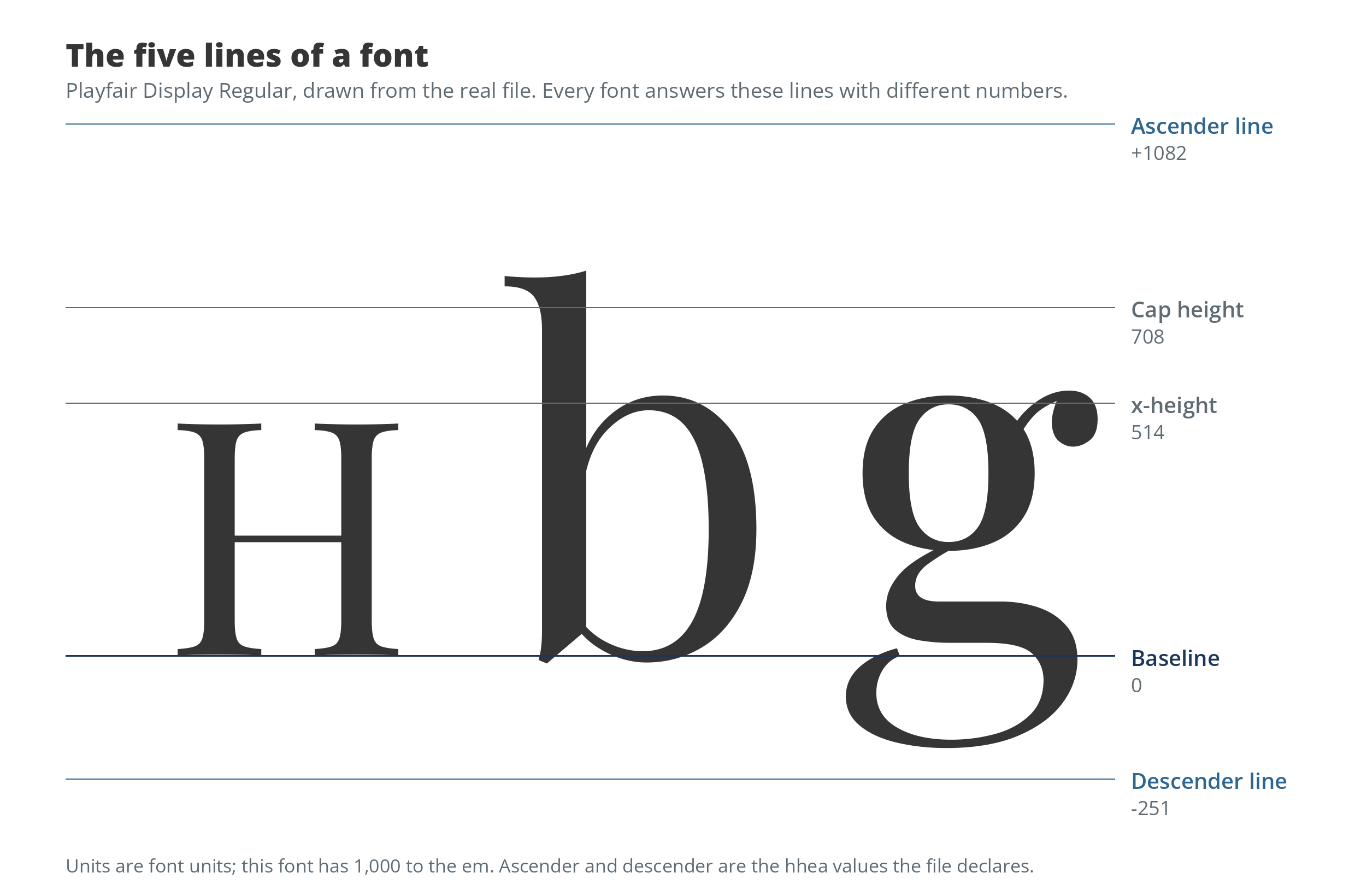
The five lines in Playfair Display, drawn from the real file. Every font answers the same lines with different numbers.
A font’s anatomy is five horizontal lines: the baseline letters stand on, the x-height of the lowercase body, the cap height of the capitals, and the ascender and descender lines above and below. Every font sets them differently, and one file can carry three disagreeing sets, which is why text spaces and clips differently across platforms.
The five lines
Open any book on type and the anatomy of a typeface is a diagram: named lines, none of them quantified. The numbers live in the file, though, and they are the rest of this page. Text sits on the baseline, the line every letter stands on. The x-height marks the top of the lowercase body, the height of x, a, e and n; the metrics hub covers how x-height is measured and why it decides how big a font reads, so here it is one line among five. The cap height is the top of the flat capital letters, H, E and T. The ascender line caps the rising strokes of b, d, h and l, and in most fonts it sits a little above the cap height, leaving room for accents over capitals. The descender line is the floor under the tails of g, p and y.
Two honest complications. Letters with curved or pointed tops, O, C, A, overshoot these lines slightly, by design: a capital O drawn exactly to cap height looks smaller than the H beside it, so type designers push it a few units past the line and the eye forgives the arithmetic. And the lines above are heights of letters. The file also declares ascender and descender metrics, numbers about spacing rather than letterforms, and those are where the trouble starts, below.
Same size, different letters
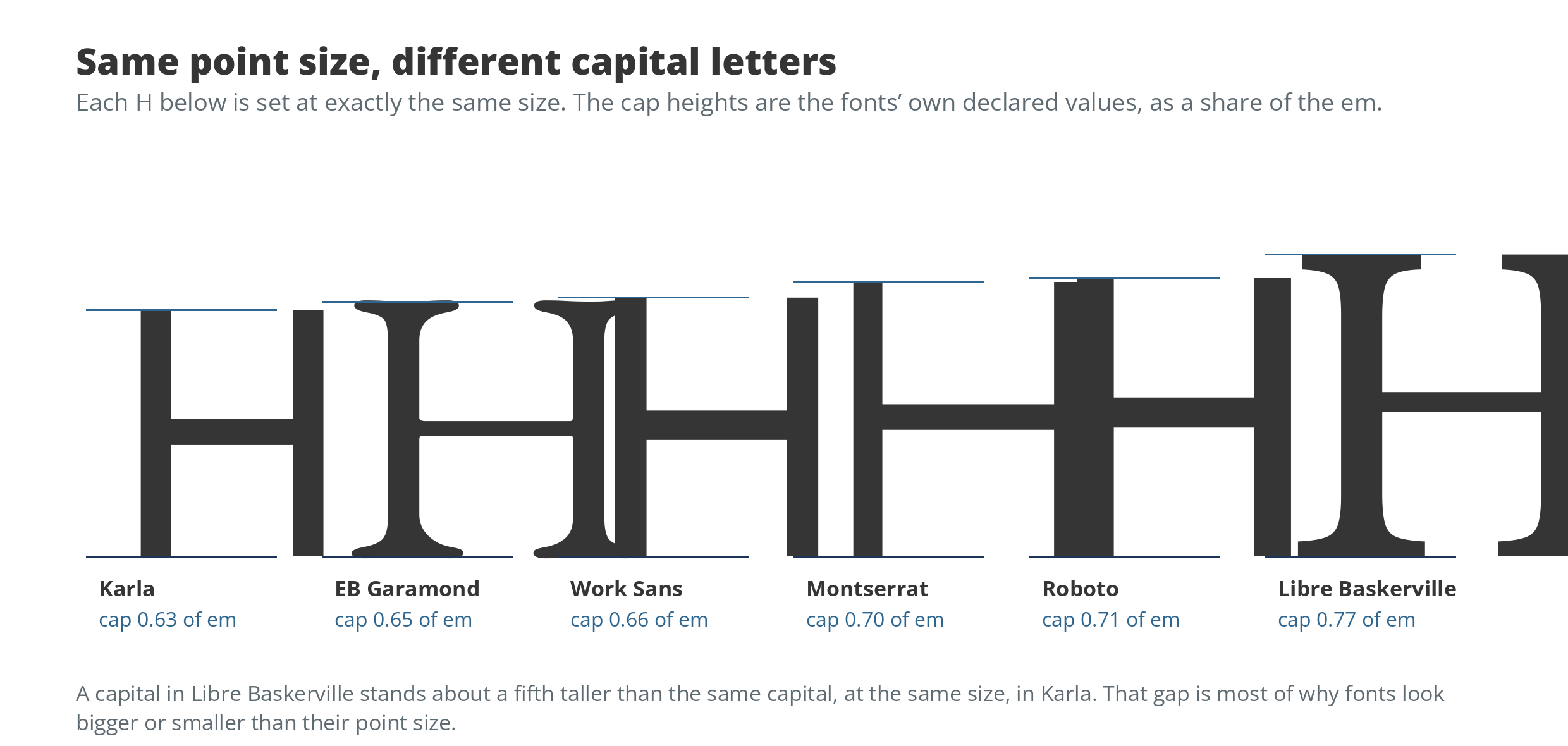
Six capitals set at the same size, each a different height. The point size never promised you a letter size.
Point size measures the em, an abstract box, not any letter in it. Measured across 23 common fonts, cap height runs from 0.63 of the em in Karla to 0.77 in Libre Baskerville, with most fonts near 0.70. A capital letter in Libre Baskerville stands about a fifth taller than the same capital, set at the same size, in Karla. Swap fonts at a fixed point size in a headline, a logo lockup or a button and the letters change size even though the number in the size box never moved.
Cap height and x-height together explain most of the everyday mystery of fonts that “look bigger” than the font beside them. They also set a floor on legibility: below a certain size, a font whose lowercase and capitals are short inside a large em simply puts fewer pixels into the parts of letters you read by.
Three sets of numbers in every font file
Here is the part the anatomy diagrams never mention. A modern font file does not carry one ascender and one descender. It carries three sets of vertical metrics, written in different decades for different masters. The hhea values are the oldest, the horizontal header metrics every renderer once used. The typographic values, in the OS/2 table, are the ones the OpenType specification recommends for line spacing. The Windows values, also in OS/2, exist because Windows historically used them both for line spacing and as a clipping box, and set them generously, to the extremes of the glyphs rather than to the rhythm of the text.
Ideally the three agree. Measured across the same 23 fonts, in 20 of them they do not: at least one set gives a different ascent from the others. Some of the disagreement is deliberate, the Windows set stretched to cover tall accents. Some is archaeology. Roboto’s typographic ascent is a leftover 1,536 against an hhea value of 1,900, and Roboto does not set the flag bit (called USE_TYPO_METRICS) that asks renderers to prefer the typographic set; with the bit unset, most software ignores those numbers entirely, which is just as well.
Why Windows and Mac read the same font differently
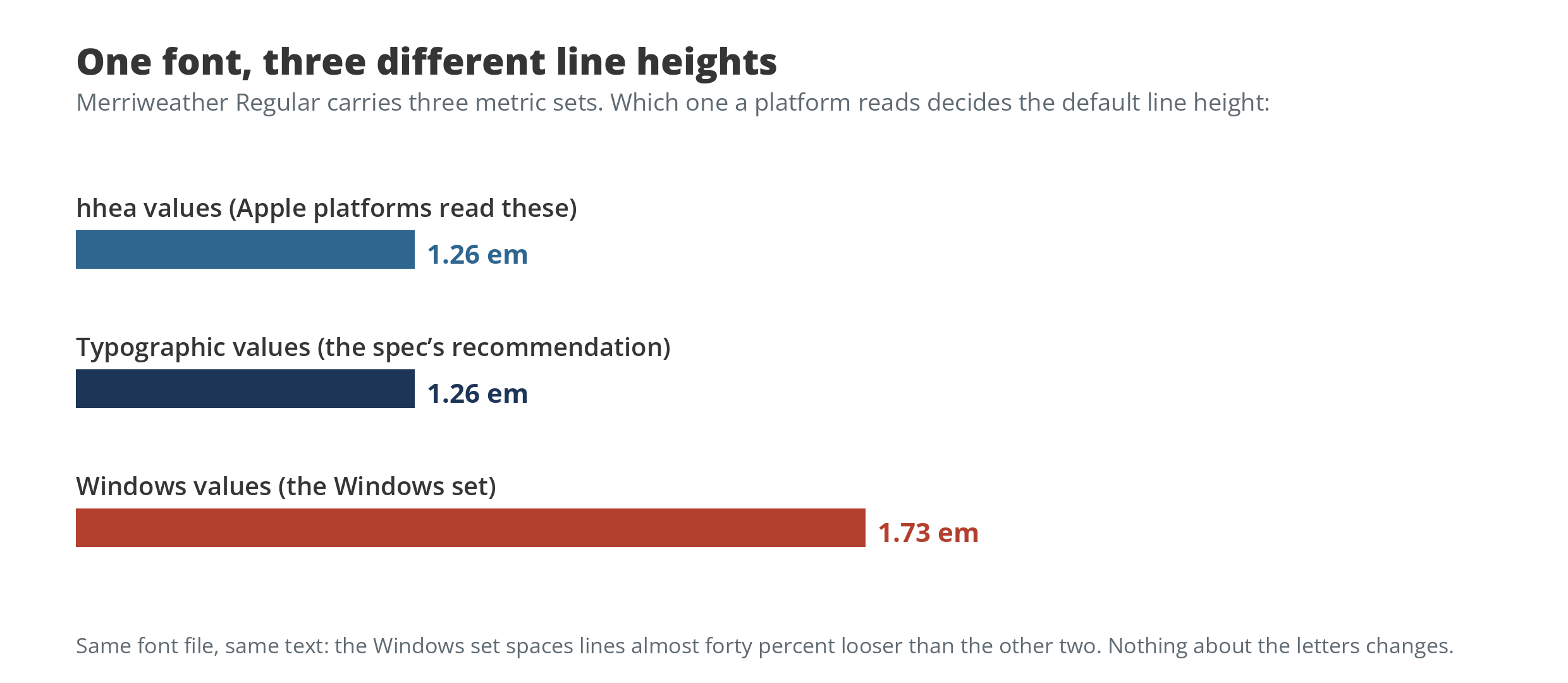
The same font defends three different line heights. The platform picks.
Platforms picked different sets and stayed loyal. Apple’s text stacks space lines by the hhea values. Windows software that follows the Windows set gets the generous box; newer Windows renderers use the typographic values when the flag bit asks them to. Web browsers, left at the default line-height: normal, inherit whichever numbers their platform stack hands them, which is why the same page, in the same font, can sit slightly looser on one system than another, and why experienced web developers set line-height explicitly and stop thinking about it.
Merriweather shows how large the gap can grow. Its hhea and typographic sets agree on a default line height of about 1.26 em. Its Windows set says 1.73 em, nearly forty percent looser. Nothing about the letters changes; only which of the file’s three answers the machine believes.
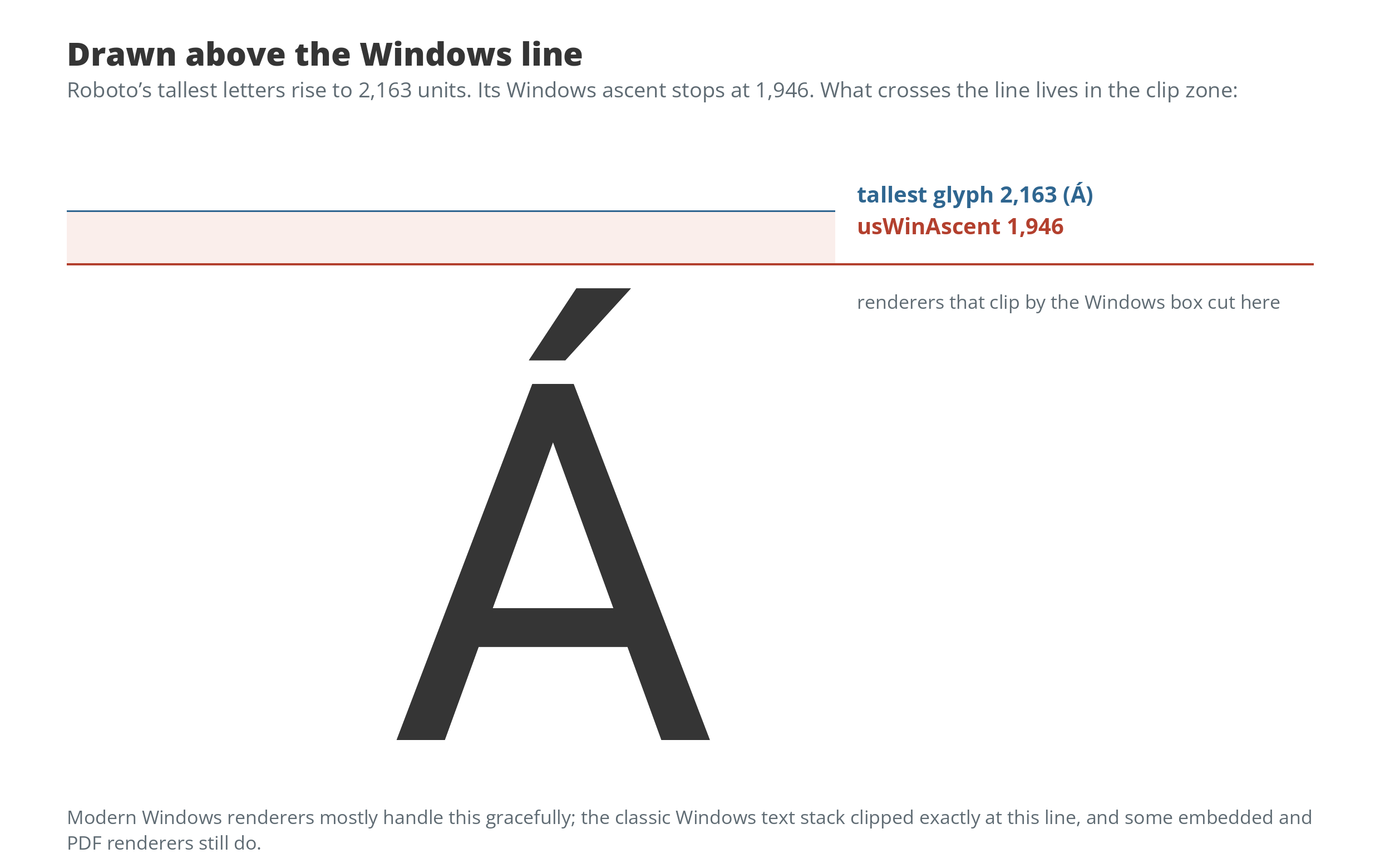
Roboto’s tallest letters rise to 2,163 units; its Windows ascent stops at 1,946. Ubuntu shares the condition.
The Windows values also drew a box, and what left the box could be cut off. Roboto’s accented capitals rise above its own Windows ascent, and Ubuntu’s do the same; in the classic Windows text stack, and still in some embedded and PDF renderers, ink above that line is clipped flat. If you have ever seen an accented capital lose the top of its accent in a button or a form field, you have met the third metric set.
What to do with five lines
For readers choosing fonts: when two fonts at the same size look like different sizes, they are. Compare cap height and x-height, the numbers this site’s font metrics hub measures for every metric it tracks, before blaming your eyes.
For anyone shipping text in software: the font’s internal disagreement is not yours to fix, but it is yours to route around. Set line-height explicitly wherever spacing matters, and when a face is destined for tight UI boxes, check that its tallest accented capitals fit inside the box the platform will actually use. The five lines stop being trivia the first time one of them cuts a letter in half.