· guides, reference
Font managers compared: Mac, Windows, Linux
Every font you install stays on duty forever: in every menu, in every app, slowing the choosing and occasionally breaking the layout. A font manager exists to break that deal. Its defining trick is activation: making a font available to your applications without installing it, and switching it back off without deleting the file. Around that trick, managers add the rest of the job: organizing thousands of files into collections and tags, previewing and comparing, waking the right fonts automatically when you open a document, and, at the professional end, keeping track of what you are actually licensed to use.
This survey covers the field as it stands: the built-ins you already have, the independents worth paying for, the studio tier where license tracking lives, the subscription and rental services, and the online tools, which turn out to have a hard ceiling. Prices were checked against vendor pages in October 2026; this category reprices and rebrands often (one major product was renamed mid-research), so treat every figure as “current when checked,” not eternal.
The built-ins: free, and mostly install-only
Font Book (macOS) is the strongest tool any OS ships. It installs, validates (with plain green, yellow, and red verdicts), resolves duplicate fonts, organizes with collections and Smart Collections, and genuinely activates and deactivates: a deactivated font stays on your Mac, dimmed, until you want it back. What it lacks is everything professional: no keyword tagging beyond collections, no auto-activation plug-ins for design apps, no license features at all.
Windows has no equivalent. The Settings fonts page lists, previews, installs, and uninstalls, and that is the whole tool. There is no activation: the softest option is Hide, and hiding only works in apps that honor it (Microsoft’s own support forums carry years of complaints that Office ignores it). Fonts also install in two scopes, per-user and all-users, which quietly manufactures duplicates the built-ins cannot detect.
Linux has one real manager: the GTK app simply called Font Manager, which activates and deactivates families and collections, auto-categorizes by font properties, and even integrates the Google Fonts catalog. Its own author describes it as a simple tool for average desktop users, not a professional solution, which is honest and accurate. GNOME Fonts is a viewer and installer, not a manager.
The independents
FontBase: the free default
FontBase runs on all three desktop platforms, and its free tier already does the essential job: activate any font or whole collection in one click without installing, watch folders so new files appear automatically, and use any Google Font in one click as if it were local. The paid Awesome tier ($3 a month, $29 a year, or $180 lifetime) holds the depth: tags, auto-activation plug-ins for Photoshop, Illustrator, and InDesign, SuperSearch filtering by measured properties like x-height and contrast in numeric ranges, and a starter set of license tools (seats per font, expiry dates, team license sync). Its weak spot is duplicates: FontBase can list families that contain duplicates, but the cleanup is manual. Vendor-stated format support is .ttf and .otf only, so TrueType Collections and old Type 1 fonts are outside its world.
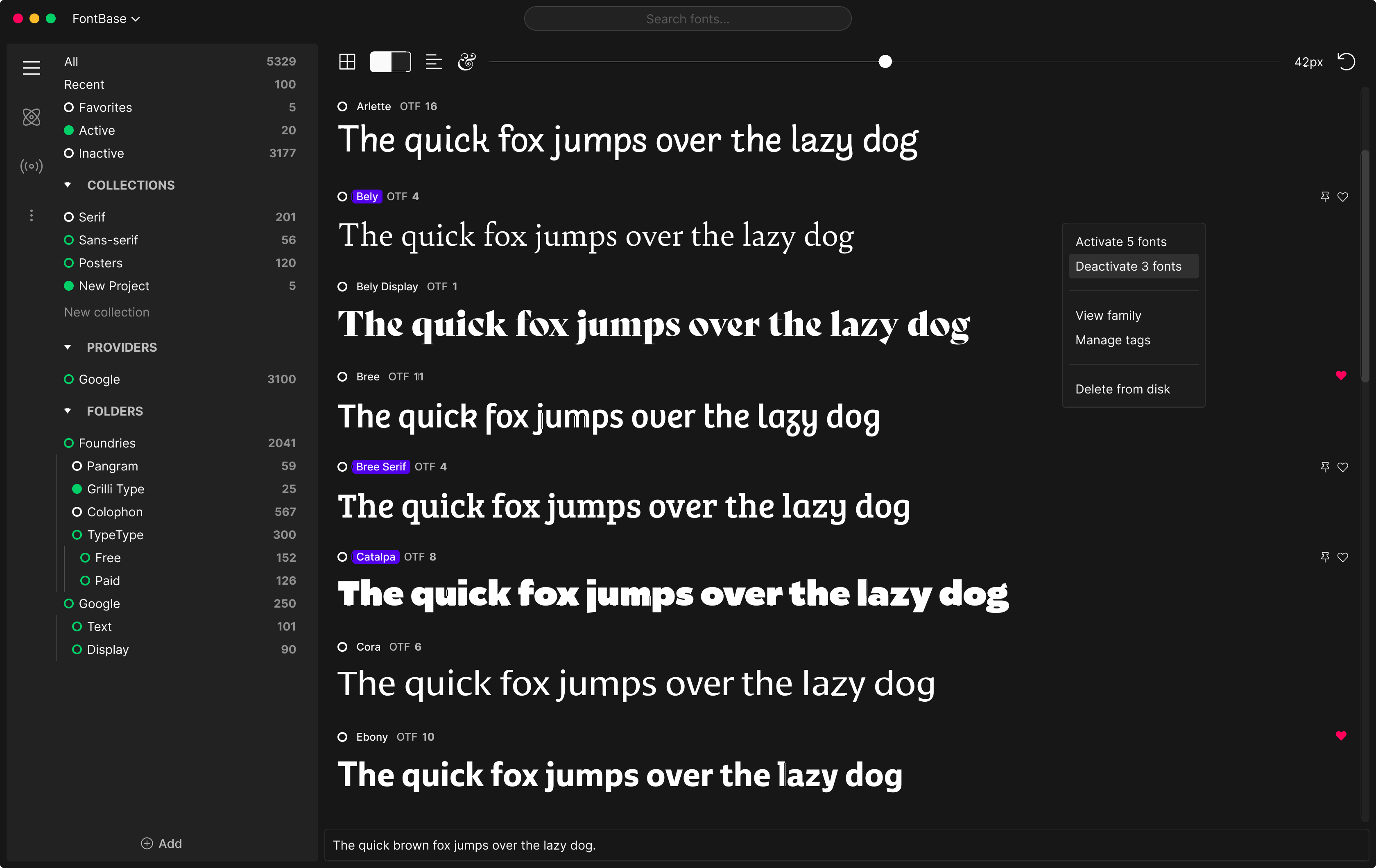
Screenshot: FontBase. The sidebar is the product in miniature: collections, providers (Google among them), watched folders, and one library of 5,329 fonts. Credit: FontBase.
RightFont: the calm Mac library
RightFont ($59 one time per device, with a year of updates) is Mac-only and proud of it. It activates fonts without copying them into the system folder, auto-activates missing fonts in Adobe apps, Sketch, and Office, and browses Google Fonts and Adobe Fonts libraries inside the app. Team use is deliberately simple: libraries live in a shared Dropbox or Google Drive folder. There is no server, no admin console, and no license tracking of any kind, which tells you exactly who it is for: one designer, or a few, who want order without infrastructure.
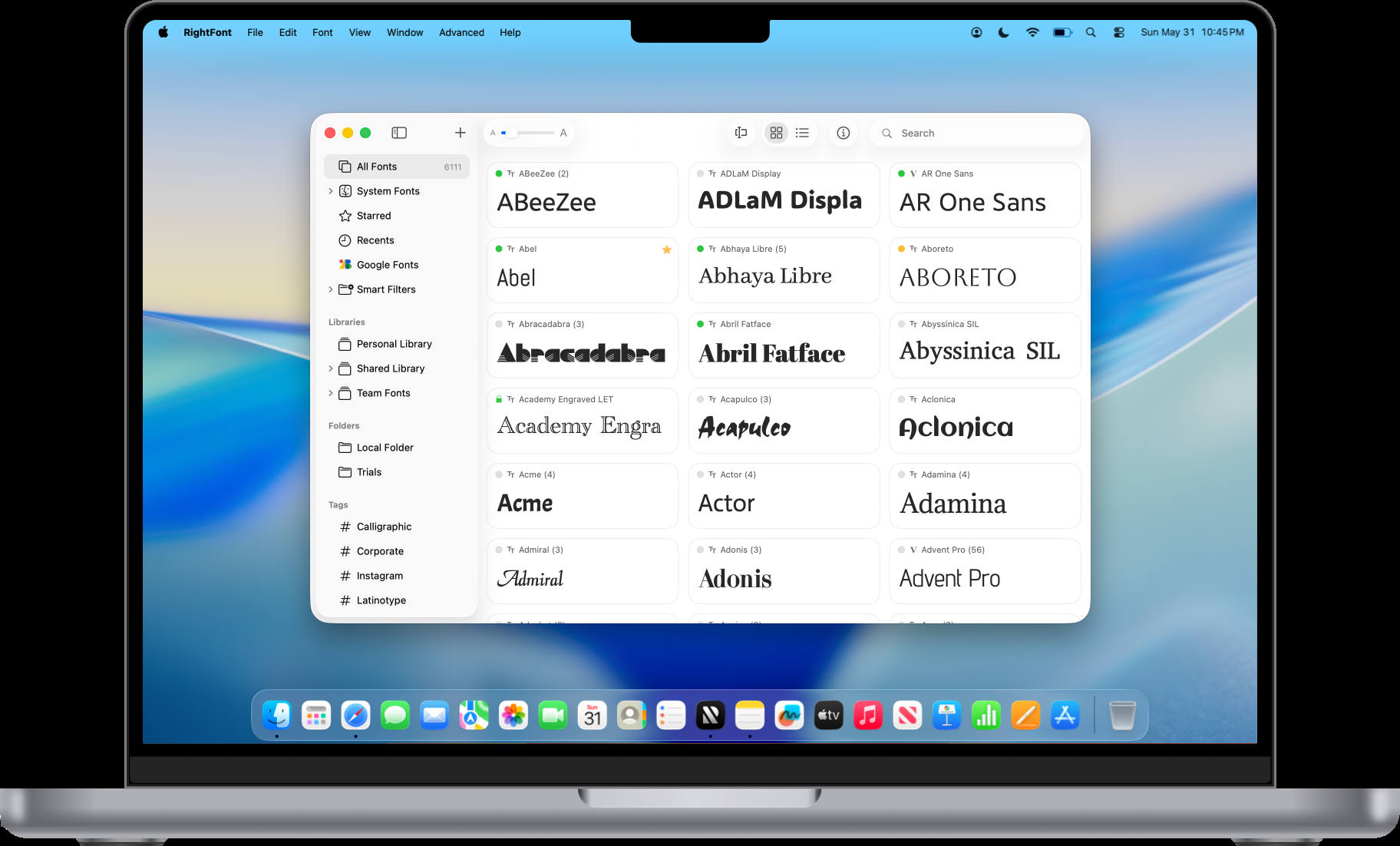
Screenshot: RightFont. Note the library sources in the sidebar: system fonts, Google Fonts, Adobe Fonts, and personal, shared, and team libraries side by side. Credit: RightFont.
Typeface: the organizer’s organizer
Typeface (Mac only, one-time purchase, no subscription) activates fonts in place, persistently or temporarily (temporary fonts switch off when you quit or shut down). Its organization is the deepest in this class: nested, combined, and even inverted tags, fuzzy multi-tag search, filters by style properties and required characters, and a duplicate finder. Independent testing reports it staying smooth with libraries past 15,000 fonts. It has no license features and no cloud sync of its own; like RightFont, it expects your library folder to live wherever you put it.
MainType: the Windows counterpart, with hard caps
MainType (Windows only, by High-Logic) loads fonts temporarily (gone at reboot) or installs them, in groups you can load and unload as sets. It is the only product here that states its scale limits on the box: the free edition holds 2,500 fonts (and is licensed for non-commercial use only), Standard ($49) holds 10,000, Professional ($79) is unlimited. Duplicate and invalid-font detection come in every edition. What it calls license support is a notes field you type into yourself; there is no license system behind it.
NexusFont: the dormant favorite
NexusFont (Windows, free) was the collector’s standby for years: fonts loaded while it runs are available to every app, with groups, tags, a duplicate finder, and a portable mode that runs from a USB stick. Its last release is from late 2022, with silence since. It still works; it is also a standing lesson in this category’s mortality, which the limitations section returns to.
The studio tier: where license tracking actually lives
Solo tools organize fonts. Studio tools answer a harder question: can you prove you are allowed to use them? Two products take that question seriously, and comparing them shows both the state of the art and its limits.
Extensis Connect, the descendant of Suitcase Fusion, is mid-rebrand: Extensis is now a Monotype company, and its live product page presents the tool as Monotype Connect at $200 per user per year (Pro, $300). What the money buys is governance: cloud libraries shared across a team, auto-activation plug-ins (Font Sense) for the Adobe apps, single sign-on, license usage tracking and reporting, and, at the Pro tier, project risk scanning that audits Adobe project files for unlicensed or oversubscribed fonts and produces a risk report. It syncs Google Fonts, Adobe Fonts, the Monotype library, and your own uploads into one library.
FontAgent (Insider Software) takes the other route. The standalone app ($59 per user per year; the one-time edition is gone) organizes deeply and ships Adobe auto-activation plug-ins. The compliance product is its CloudServer tier, and its design contains the most honest sentence in this entire category: font files do not state how many seats they are licensed for, so an administrator must define each license (type, seat count, purchase details) by hand before any tracking can happen. Once defined, the tracking is genuinely detailed: who downloaded which fonts, who activated and deactivated them, on which machines, with compliance exports and the ability to reclaim unused fonts. It is the strongest documented compliance tool here, and it is built on hand-typed records.
Three questions separate the marketing from the reality, for any tool:
| The question | The honest answer, category-wide |
|---|---|
| Can it store license info per font? | Only at the top: FontAgent CloudServer (hand-entered), Connect (centralized docs), FontBase Awesome (seats, expiry) |
| Can it store the license text? | No product does this as a feature. At best, you paste it into a notes field |
| Can it enforce seat counts? | FontAgent CloudServer flags over-distribution; services that control delivery (below) enforce their own catalogs only |
If license terms are your problem, our font licensing explainer covers what the licenses actually say; the short version is that no manager reads them for you.
Renting and services: the library you do not keep
Adobe Fonts is bundled with Creative Cloud: activate a family in the app and it appears in every desktop app’s menus. It is activation as a service, with service rules: the files cannot be copied out or packaged for a print shop, collaborators need their own subscriptions, and when the subscription ends, live documents lose the fonts (finished, embedded output keeps working). Since 2020 you can also upload your own .ttf and .otf fonts to Creative Cloud, which makes it a partial manager, for subscribers only.
Monotype Fonts is the web-first version: a platform where you search, organize, and share, plus a desktop app that activates what you synced and hunts down missing fonts in Adobe, Sketch, Figma, and iWork documents. Read its headline carefully: the library of over 250,000 fonts is a prototyping library. The $199 per year individual plan licenses 10 production fonts for commercial deployment. That is not a criticism of the model; it is the model, and you should walk in knowing it.
Fontstand is the honest rental shop: a free app, any font free for a 3-hour trial, then exactly 30 days for 10 percent of the license price, and after twelve rental periods the font is yours permanently, files and foundry license included. Activation is automatic and system-wide while the rental runs. It manages nothing you already own; it is a catalog with a very good activation engine.
Online font managers: a ceiling made of browser
Can a website do this job? Almost, and the “almost” is permanent. A browser can read your installed fonts through the Local Font Access API (Chromium only, permission-gated), and it can render dropped font files inside its own page. It cannot install a font into the operating system or activate one for Photoshop. Every working “online” font manager therefore splits in two: a web interface for browsing and organizing, and a local agent that does the activation (that is the Connect and Monotype architecture exactly).
The one established pure-web product, Wordmark.it, accepts the ceiling and becomes a choosing tool: preview your text in your installed fonts, tag and shortlist (paid tiers), preview uninstalled fonts by dragging them in. Excellent at its job; its job is not management. Google Fonts’ selections are the other common misunderstanding: a shareable shortlist and a zip download, not a library that syncs anywhere.
The comparison table
| Manager | Platforms | Price | Activate without installing | Auto-activation | License tracking | Best for |
|---|---|---|---|---|---|---|
| Font Book | Mac | Free, built in | Yes | No | None | Mac users with a few hundred fonts |
| Windows Fonts | Windows | Free, built in | No (install only) | No | None | Nothing beyond the basics |
| Font Manager | Linux | Free, open source | Yes | No | None | Linux desktops |
| FontBase | Mac, Win, Linux | Free; Awesome $29/yr or $180 lifetime | Yes | Adobe (paid) | Light (paid): seats, expiry | The default upgrade, any OS |
| Typeface | Mac | One time | Yes | Partial | None | Huge Mac libraries, taggers |
| RightFont | Mac | $59 one time | Yes | Adobe, Sketch, Office | None | Solo Mac designers, small teams |
| MainType | Windows | Free to $79 one time | Yes (load or install) | No | Notes field only | Windows collectors (mind the caps) |
| NexusFont | Windows | Free | Yes, while running | No | None | Legacy pick; unmaintained since 2022 |
| Connect (Monotype Connect) | Mac, Win, web | $200/user/yr; Pro $300 | Yes | Adobe suite, Office sets | Usage tracking; project risk scans (Pro) | Studios that must answer audit letters |
| FontAgent | Mac, Win | $59/user/yr; server tier by quote | Yes | Adobe | Strongest (server): records, tracking, exports | Compliance-first organizations |
| Adobe Fonts | Mac, Win | In Creative Cloud | Yes | Inside Adobe apps | Own catalog only | Creative Cloud subscribers |
| Monotype Fonts | Web + Mac, Win app | $199/yr individual | Yes, via sync | Missing-font plug-ins | Own catalog only | Teams standardizing on Monotype |
| Fontstand | Mac, Win, iPad | Free app; rent per font | Yes, automatic | System-wide while rented | Own rentals only | Trying commercial fonts legally |
| Wordmark.it | Web | Free core; paid tiers | No (browsers cannot) | No | None | Choosing among installed fonts |
Which one, by audience
Professional studios are buying three things: auto-activation that survives Adobe’s update cycle, team libraries without file chaos, and an audit trail. That is Connect or FontAgent CloudServer money, and the choice between them is reporting style: project risk scans (Connect Pro) versus per-user, per-machine activation records (FontAgent). Everyone should know the shared limit: a font installed by hand, outside the manager, is invisible to both.
Collectors need scale, dedupe that understands five files with one name are usually five different fonts, and software that will still be theirs in ten years. The buy-once shelf is short: MainType Professional (Windows), Typeface (Mac), RightFont, FontBase’s lifetime tier. Read edition caps before falling in love: 2,500 fonts is a small collection in this hobby.
Everyone else should start with FontBase’s free tier (or Font Book, on a Mac, until it pinches). Activation plus one-click Google Fonts covers most of what most designers actually need, and the paid tier is cheap when it stops being enough.
The fine print: limitations of the whole category
- Vendors die. FontExplorer X, the professional standard for years, was retired by Monotype: sales ended June 30, 2022, support ended June 30, 2023, and users were steered to a subscription. NexusFont has not shipped since 2022. Extensis has been absorbed and its product renamed twice in four years. Whatever you choose, keep your font files in folders you control, outside any app’s private vault.
- Subscriptions are the direction of travel. Suitcase became Connect (subscription). FontAgent dropped its one-time edition. When a manager’s library lives in a vendor’s cloud, canceling exports your library into a reorganization project.
- The hosts keep moving. Auto-activation is plug-ins chasing Adobe releases and macOS updates; expect occasional breakage after either. Only macOS offers managers a first-class activate/deactivate concept, which is why the Mac side of this category is richer than Windows’, where there is not even an OS-level activation to build on.
- License data is manual everywhere. Seat counts and terms are not inside font files, so every compliance feature in every product rests on records a human typed. The most sophisticated tooling in the field is, underneath, a careful spreadsheet with activation telemetry attached. (Our guide to installing fonts covers the manual basics the built-ins leave you with.)
- Managers barely look at the letterforms. Nearly all of them show the metadata the file already carries (name, foundry, version, copyright string). Filtering your own library by measured properties, x-height, contrast, weight, width, slant, exists in essentially one prosumer feature (FontBase’s SuperSearch) and Typeface’s style filters. Similarity search across your own files does not exist in this category at all; the “similar fonts” tools search the vendor’s catalog, not your disk.
The short version
A font manager is a library plus a switch. Judge the switch (activation and auto-activation are where hours are saved) and judge the library’s survivability (your files, your folders, exportable organization). For most people the answer is FontBase free, then paid when it pinches. For Mac collectors, Typeface or RightFont. For Windows collectors, MainType Professional. For studios with license exposure, FontAgent CloudServer or Connect, chosen by the report you would rather hand an auditor. And for everyone: the fonts you own should live somewhere that outlives whichever app you pick.